
We tested Frigate on a Jetson Orin Nano Super installed in Turing Pi 2.5, using a USB webcam and NVMe storage to capture video, detect people and record events locally. Then we measured the camera pipeline at three video rates to find out where the CPU time and recording space went.
The core system worked: Frigate captured a real walk, generated person events with snapshots and playable clips, and recorded H.264 video to NVMe. A second test replayed the recorded walk and reproduced person events and snapshots. Across longer runs, the camera and processing rate gauges tracked 480p at 5 FPS and 720p at both 15 and 30 FPS. The interesting trade-off was the cost of converting a USB webcam’s MJPEG output into H.264.
Deployment note: This was a network-isolated hardware experiment on JetPack 7.2.1 using a community Frigate 0.18.0 build, not a validated production installation. That version has known critical security vulnerabilities. We kept the container offline with no published ports. The official Frigate 0.18.2 release fixes those critical issues and lists a JetPack 6 TensorRT image, but the JP6 image has not been tested on this exact Turing Pi system.
The local camera pipeline
Our setup placed a Jetson Orin Nano Super 8GB on a Turing Pi 2.5, with a Logitech Brio 100 connected over USB. The webcam sends MJPEG frames. go2rtc launches FFmpeg to transcode those frames into a local H.264 stream, which Frigate uses for recording and object detection. Recordings, snapshots and event clips stayed on the Jetson’s NVMe drive.
Logitech Brio 100 (USB, MJPEG)
               |
               v
Jetson Orin Nano Super on Turing Pi 2.5
      go2rtc / FFmpeg transcoder
               |
               v
       Local H.264 restream
               |
          +----+----+
          |         |
          v         v
      Frigate    MP4 recorder
      detector   to NVMe
          |
          v
    Person events and snapshots
The measured platform ran JetPack 7.2.1-b49 / Jetson Linux R39.2.1, Docker 29.8.0, CUDA 13.2, ONNX Runtime 1.23.0 and TensorRT 10.16.2. The Jetson was in its 25 W nvpmodel mode; 25 W is a configured power mode, not a measured wall-power draw. The detector was a YOLOv9-t ONNX model with a 320×320 input, tracking person. Continuous MP4 recording used a 500 GB Crucial P310 NVMe drive formatted as ext4.
Only one camera and one Jetson were included in the benchmark. An RK1 running Home Assistant, multi-camera behavior and networked NVR operation were not tested.
How we routed the Brio stream
The Brio offered MJPEG capture at 640×480 and 1280×720. We checked the device and supported capture modes with V4L2 before starting Frigate:
v4l2-ctl --list-devices
v4l2-ctl -d /dev/video0 --list-formats-ext
lsusb -t
A device path such as /dev/video0 can change after reconnecting the camera. The tested camera-routing excerpt for 640×480 at 5 FPS was:
go2rtc:
  streams:
    brio100:
      - "ffmpeg:device?video=0&input_format=mjpeg&video_size=640x480&framerate=5#video=h264"

cameras:
  brio100:
    ffmpeg:
      inputs:
        - path: rtsp://127.0.0.1:8554/brio100
          input_args: preset-rtsp-restream
          roles: [detect, record]
    detect:
      enabled: true
      width: 640
      height: 480
      fps: 5
    objects:
      track: [person]
For the two 720p modes, the source’s video_size was 1280x720, while its framerate and Frigate’s detect.fps were both set to 15 or 30, respectively. The model’s tensor input stayed 320×320. These were deliberate benchmark settings, not a recommendation for a home NVR. Frigate recommends around 5 detection FPS for most cameras; setting detect.fps to 15 or 30 makes more frames eligible for detection and can increase CPU/GPU work when motion is present. Crucially, detect.fps is a configured target, not proof that the detector actually ran that many times per second.
This excerpt shows the tested camera-routing settings, not a complete Docker Compose or safe, standalone deployment recipe for the older image. See Frigate’s camera configuration documentation when configuring a supported image.
Camera throughput: 5, 15 and 30 FPS
We ran each live mode for roughly 90 minutes, including a 10-minute startup warm-up, and ran an additional 70-minute 480p soak. The benchmark collected Frigate API gauges approximately every 16.6–16.9 seconds, excluding warm-up rows from the summarized medians. A power outage split the 720p30 window into an initial and a separately warmed-up resumed segment.
| Camera mode | Window, including warm-up | Usable API samples | Camera FPS p50 | Process FPS p50 |
| 480p, 5 FPS | 89m54s | 289 | 5.00 | 5.00 |
| 720p, 15 FPS | 89m44s | 287 | 15.00 | 15.00 |
| 720p, 30 FPS, initial | 59m17s | 177 | 30.10 | 30.10 |
| 720p, 30 FPS, resumed | 30m28s | 73 | 30.10 | 30.10 |
| 480p, 5 FPS, final soak | 69m50s | 214 | 5.00 | 5.00 |
This is video-pipeline performance, not 30 person detections per second. The camera and process FPS gauges followed the configured capture rates, but the object detector did little work during most samples. Four of the five windows had a median detection-run gauge of zero; the fifth, the final 480p soak, had a median of 0.50 runs/s. The resumed 720p30 window was entirely idle according to its sampled detection gauge. These results therefore characterize camera handling, software transcoding and recording much more than sustained, motion-heavy detection. A busier scene could change the resource profile.
Frigate defines detection_fps as the number of times detection runs per second. Here are the sampled activity values from the same windows, in runs/s. They should not be interpreted as an object count or as calibrated sustained detector capacity. Some p95 values exceeded camera FPS; detection runs and input frames are different measures, and the saved evidence did not reconcile the individual region-level detector calls.
| Window | Detection-run gauge, p50 / p95 (runs/s) |
| 480p5, initial | 0.00 / 6.46 |
| 720p15 | 0.00 / 0.27 |
| 720p30, initial | 0.00 / 3.18 |
| 720p30, resumed | 0.00 / 0.00 |
| 480p5, final soak | 0.50 / 12.26 |
An operator-confirmed walk and a separate full-rate replay verified person-event creation with actual footage. Those functional checks complement the mostly quiet-scene video-performance measurements; they are not a detection-accuracy score.
Where the CPU time went
The Brio’s MJPEG stream needed to become H.264 for our recording/restream setup. The Orin Nano lacks a hardware video encoder, as Frigate’s Jetson acceleration documentation explains, so this particular conversion ran in software. The CPU cost grew sharply at higher resolutions and frame rates.
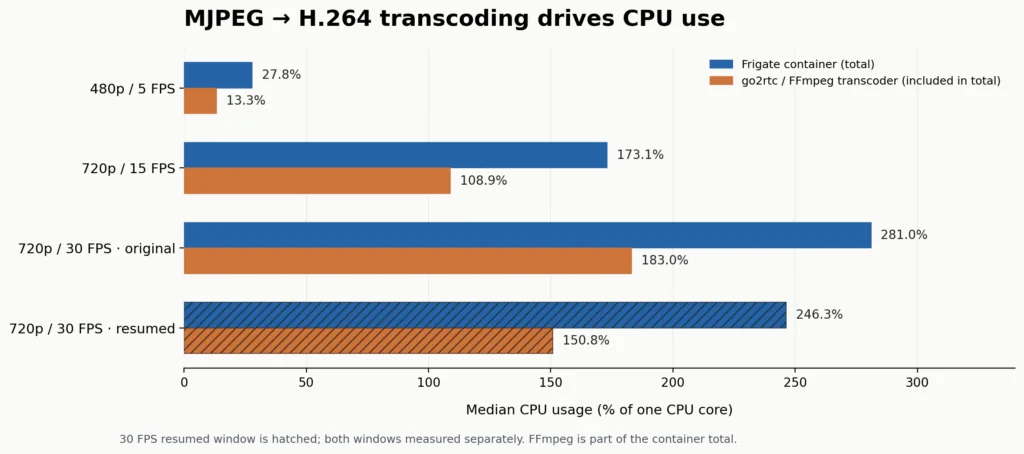
Figure 1. Frigate container CPU includes the FFmpeg transcoder. These percentages are core-equivalents: 100% represents one fully occupied CPU core, not the entire board.
| Mode | Frigate container CPU p50 | FFmpeg transcoder CPU p50 | Max container RAM |
| 480p5, initial | 27.75% | 13.30% | 1.329 GiB |
| 720p15 | 173.14% | 108.90% | 1.416 GiB |
| 720p30, initial | 281.03% | 183.00% | 1.437 GiB |
| 720p30, resumed | 246.31% | 150.80% | 1.428 GiB |
| 480p5, final soak | 35.36% | 17.30% | 1.256 GiB |
The transcoder consumed roughly 60–65% of total container CPU at 720p. That ratio does not identify how all the remaining CPU cycles were spent. In particular, our Frigate benchmark used software H.264 decoding after the restream: hardware decoding was not configured, the startup log reported no video-decoding acceleration, and NVDEC telemetry remained off.
In a separate short experiment, FFmpeg’s h264_nvv4l2dec decoded H.264 video successfully and NVDEC activity was observed. This proves the Jetson’s hardware decoder path works, but we did not benchmark a fully hardware-decoded Frigate camera pipeline. A camera supplying H.264 directly could eliminate this specific MJPEG-to-H.264 transcode, although its whole-system CPU impact would need a separate controlled test.
TensorRT: what the runtime tests actually show
The model-runtime test used the same fixed-shape random float tensor for CPU and TensorRT-prioritized ONNX Runtime sessions. Each backend ran three unmeasured warm-up calls followed by 50 timed calls; session creation was excluded. Profiling assigned 53 graph-node events to TensorrtExecutionProvider, providing direct evidence that TensorRT actually executed GPU work in the diagnostic test.
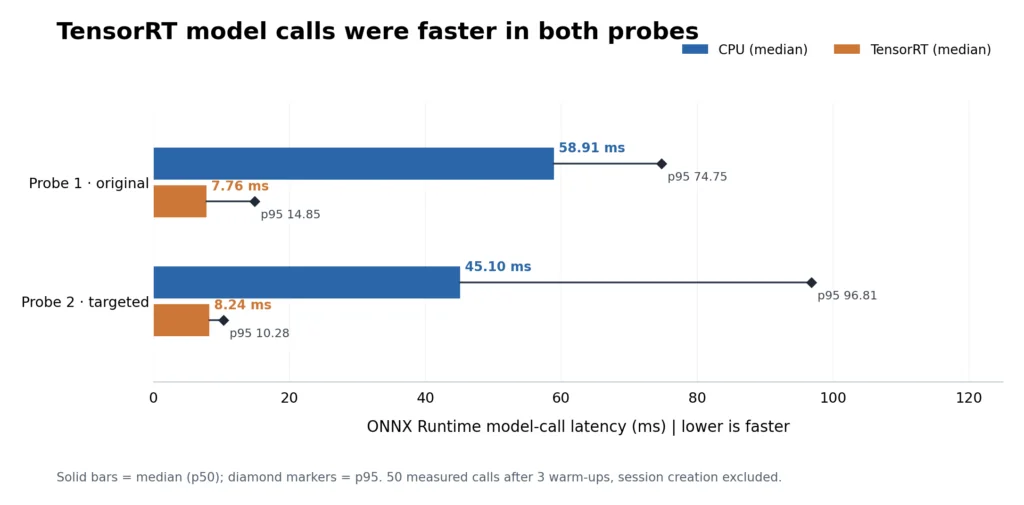
Figure 2. Two independent, 50-call ONNX Runtime probes. Bars are median model-call times; diamonds mark p95. Session creation was excluded. These are not end-to-end camera-to-event timings.
The first probe recorded CPU median/p95 at 58.91/74.75 ms and TensorRT at 7.76/14.85 ms. The later independent probe gave 45.10/96.81 ms on CPU and 8.24/10.28 ms with TensorRT prioritized. The median model-call advantage was therefore about 5.5× to 7.6× across the two separate probes, not a single universal speedup. Both runs used three warm-ups, 50 calls and excluded engine/session initialization. The later probe also measured model-call-plus-YOLO-post-processing medians of 45.64 ms on CPU and 8.64 ms on TensorRT.
The runs took place under different host workloads, and the CPU medians and p95 values changed. We did not isolate the cause; GPU frequency scaling, concurrency and the difference between repeated model calls and sporadic camera detections are possible factors, not proven explanations. The two data sets must be interpreted separately.
Frigate’s own inference-speed API reports a smoothed value that includes a broader detection path than raw session.run(). That is why its sampled 16–20 ms values should not be compared directly with the isolated 8 ms calls. We did not quantify the difference stage by stage. During the resumed 720p30 window the gauge remained fixed at 16.16 ms while detection was idle, so it represents a stale last value, not unusually consistent latency.
CPU and TensorRT returned finite raw arrays with the same shape, but numerical parity on real images was not established. These figures validate a runtime pathway, not detector accuracy or a whole-camera 7× speedup.
Person events and recordings worked locally
In our live functional test at 640×480/5, one walk through the Brio’s field of view created two person event records, both with valid JPEG snapshots and playable H.264 clips. That means two event records from one walk, not two separate people.
We later replayed the clip Frigate had recorded from that event: 640×480 H.264, 5 FPS, 33.6 seconds, looped for 75 seconds. Frigate produced three person event records and three valid snapshots. Since the input was an event clip that Frigate had already cut around a detected person, this is a useful repeatability and pipeline-function check, not an independent accuracy test. Replay recording was disabled, so it was not expected to produce additional clips.
We also decoded the first and last recorded segments from completed live windows, with eight representative live playback checks passing. The original power-interrupted 30 FPS window did not receive its planned playback checks; its separately resumed window did. These sampled checks confirm that recordings were playable, not that every segment or saved frame was exhaustively audited.
Recording to NVMe: capacity matters more than peak SSD speed
We measured media-folder growth over time, separately from whole-device NVMe write counters. The rows below give observed growth and an hourly rate calculated from each observation window. They are not direct storage-throughput benchmarks or promises about daily retention.
| Mode/window | Recorded growth | Calculated GiB/hour |
| 480p5, initial | 0.493 GiB in 89m54s | 0.330 |
| 480p5, final soak | 0.486 GiB in 69m50s | 0.418 |
| 720p15 | 2.672 GiB in 89m44s | 1.788 |
| 720p30, initial | 2.413 GiB in 59m17s | 2.442 |
| 720p30, resumed | 1.994 GiB in 30m28s | 3.928 |
At these observed rates, 24 hours of recording would arithmetically amount to approximately 8–10 GiB at 480p5 and 43 GiB at 720p15. The two 720p30 segments imply roughly 59–94 GiB/day, but they were different windows, separated by an outage and warm-up. These are extrapolations for planning, not 24-hour tests.
Even the two 480p5 windows differed by roughly 27% in hourly growth. Camera content, changing light, compression behavior and recording policy all matter. If retention is important, measure several representative days on the actual camera and scene. We did not attribute host-wide NVMe block writes exclusively to Frigate.
Recovery and thermal behavior
A physical unplug/reconnect trial recovered the USB stream without restarting Frigate. Recording resumed after the camera returned, with a gap of about four minutes while it was disconnected and re-establishing the stream.
A real power outage interrupted the original 720p30 test. The collected data survived; the runner later resumed the unfinished work in a separate window. The final isolated Frigate container was restored and healthy after the campaign.
The hottest sampled temperature among these runs was 63.81°C, from the resumed 720p30 segment. Telemetry rates differed: original phases used roughly one-second tegrastats, while resumed phases recorded around every 116 ms. The different sampling cadence affects observed peaks, so it is not a controlled across-mode thermal comparison. The measurements did not include a dedicated throttling-counter validation or a wall-power meter.
How this fits into the Turing Pi series
Our earlier articles covered installing a Jetson on Turing Pi 2.5, preparing GPU containers and NVMe storage, and transporting camera data and detections between Jetson and RK1 nodes with ROS 2. This Frigate test takes the next practical step: a self-contained local camera recorder running on one Jetson compute node, with measured processing cost, person events and stored video. The related guides are linked below.
The benefit of the Turing Pi platform here is workload placement: a Jetson can focus on vision while other module slots are available for independent services. We did not benchmark the same workload on a standalone Jetson carrier, nor did we test multi-camera scaling or an RK1-assisted Home Assistant automation.
For readers planning a Frigate Jetson system, the first sizing question may be the camera codec rather than GPU TOPS. Our MJPEG webcam required CPU-intensive transcoding at 720p; an H.264-native camera could avoid that specific conversion, though we did not test one. Recording growth and motion-driven detector activity also need to be measured on the intended scene.
Software compatibility and security
We deliberately kept the tested community Frigate 0.18.0 image isolated with network_mode: none and zero published ports. Its provenance was incomplete and it falls in the affected range of two Critical remote-code-execution advisories (go2rtc source-filter bypass and WebSocket authorization). The release of Frigate 0.18.2 includes fixes for those and a media-path authorization issue, and lists an upstream-published TensorRT JetPack 6 image, but no JetPack 7 image. As checked October 17, 2026, the separate Moderate-severity web-push SSRF advisory still listed no patched version. For a future, security-reviewed deployment, leave Web Push unconfigured and restrict unnecessary outbound network access as risk-reduction measures while a fix is unavailable. Neither measure is a substitute for a software patch.
For a connected deployment, use a current, security-reviewed software stack appropriate to your JetPack release; do not expose our tested 0.18.0 configuration. We have not flashed JetPack 6 on this board or tested the official JP6 image. The JP6 route is promising for a future hands-on guide, but requires carrier-specific flashing, recovery planning and fresh testing. Turing Pi’s OS flashing documentation shows an in-place forced-recovery workflow using an older Jetson Linux example; it does not establish that JetPack 6.2.1 works on this exact carrier. No Home Assistant or MQTT integration was tested here.
Troubleshooting observations
| Symptom or warning | What we observed and what to check |
| USB camera disappears after reconnect | Recheck v4l2-ctl --list-devices and the current /dev/video* assignment. Our stream recovered after a disconnect but recording had a gap. |
| High CPU use at 720p | Check whether the camera is sending MJPEG and whether go2rtc/FFmpeg is transcoding it to H.264. The measured FFmpeg CPU was part of total container CPU. |
| No hardware video-decoding acceleration | Our live stack did not configure NVDEC. A separate h264_nvv4l2dec check passed, but enabling it requires a matching supported build and configuration. |
| TensorRT plan portability warning | Cached engines can depend on the device and runtime. Rebuild and verify on the destination Jetson rather than assuming a saved engine works everywhere. |
Transient HTTP 502 or /authstartup error | The initial authentication backend started later than NGINX during a cold start. Confirm sustained service health after initialization before diagnosing a persistent failure. |
| Inference reading remains constant while nothing is detected | The Frigate EMA can retain its last value while idle; do not interpret an unchanged number as per-frame latency. |
What you’ve built
With one USB camera, a Jetson Orin Nano Super and NVMe, we demonstrated a working local Frigate camera pipeline on Turing Pi 2.5: video capture, object events, snapshots, playable event clips and continuous recording. The benchmarks make the trade-offs visible: 480p5 is comparatively light, 720p increases software-transcoding CPU sharply, and TensorRT can execute model work on the Jetson GPU.
The next useful milestone is a validated, patched deployment on a supported JetPack/image combination, followed by a real MQTT and Home Assistant automation test. That is a separate build and measurement exercise, not a result claimed in this article.
Related articles
- Jetson Orin Nano Super on Turing Pi 2.5: Complete Setup Guide
- Docker, GPU Containers & NVMe for Jetson on Turing Pi 2.5
- Distributed ROS 2 on Jetson Orin Nano and Turing Pi 2.5: Raw vs JPEG vs Detections
- Home Assistant on Turing Pi 2.5: Self-Hosted Smart Home on ARM64
FAQ
Can Frigate run on the Jetson Orin Nano Super?
Yes. Our isolated test captured video, created person events and snapshots, and wrote playable recordings. Production deployment depends on a current, compatible and security-reviewed image.
Did the Jetson detect people at 30 FPS?
We measured roughly 30 FPS in the camera and video-processing gauges, not 30 detection runs per second. Four of the five benchmark windows had median detector activity of zero runs/s, including both 720p30 windows. Person events were independently verified at 480p5 with a live walk and a recorded-footage replay.
How much storage does one camera need?
Our observed Frigate media growth ranged from roughly 0.33–0.42 GiB/hour at 480p5, 1.79 GiB/hour at 720p15 and 2.44–3.93 GiB/hour in separate 720p30 windows. Your retention depends on actual scene content, compression and recording settings.
How much faster was TensorRT than CPU?
In two separate fixed-input model-runtime probes, the TensorRT-prioritized median model call was about 5.5× and 7.6× faster than CPU, respectively. This does not measure full camera-to-event speedup, and the CPU/TensorRT detection accuracy parity was not established.
Can I install the official Frigate JetPack 6 image on this Turing Pi?
Frigate publishes a JetPack 6 TensorRT image for 0.18.2, but this board’s JetPack 6 migration and resulting installation were not tested in our work. Verify the appropriate carrier BSP and current security advisories before planning a flash.