
When a Jetson processes camera images and another computer uses the results, what should cross the network: the images, a compressed preview, or just the detections?
We compared all three on Turing Pi 2.5 using ROS 2 Jazzy. A Jetson Orin Nano 8GB handled object detection, an RK1 received the results, and a second RK1 generated competing network traffic. The difference was substantial: raw 720p30 RGB8 images used 663.4 Mb/s of payload, JPEG used 15.6 Mb/s, and detection messages used 0.55 Mb/s at the detector’s output rate.
The tests replayed a recorded Logitech Brio 100 clip from memory. Separate checks confirmed live camera capture and transfer, but the complete live camera-to-detector-to-decision-to-recording chain remains unverified.
Main findings
- Raw images used most of the receiving node’s Gigabit link. One RGB8 720p30 stream arrived at 29.99 fps on an idle network. With 400 Mb/s of competing traffic, delivery fell to 25.23 fps with best effort and 19.58 fps with reliable delivery.
- JPEG cut payload bandwidth by 97.7% for this clip. At quality 80, it maintained about 30 fps, including under 400 Mb/s of competing traffic.
- Detection messages left far more network capacity available. The detector produced about 19.4 messages per second. Their 99th-percentile round-trip time stayed near 5 ms under load, excluding inference time.
- Interface configuration also mattered. Default Fast DDS discovery caused each raw frame to be sent to three addresses in our setup. Restricting DDS to the intended Ethernet interface restored 30 fps.
The test setup
The Logitech Brio 100 was connected to the Jetson in Node 4. That module ran the GPU detector. The tests replayed a recorded Brio clip instead of live capture. The RK1 32GB in Node 3 received messages, ran decision logic and was configured to record topics to NVMe. The RK1 16GB in Node 1 ran only iperf3 to generate competing traffic.
Both the Jetson and the traffic generator sent data to Node 3 through the board’s integrated Gigabit switch. Their traffic therefore shared the receiving RK1’s single Gigabit port.
| Component | Configuration |
| Jetson, Node 4 | Orin Nano 8GB; Ubuntu 24.04.5; JetPack 7.2.1-b49; Jetson Linux R39.2.1; CUDA 13.2.2 |
| Jetson power and cooling | 25 W mode; clocks not locked; fan profile reported as quiet |
| Receiver, Node 3 | RK1 32GB; Ubuntu 24.04.4; NVMe storage |
| Traffic generator, Node 1 | RK1 16GB; Ubuntu 22.04.3; iperf3 only |
| ROS | Jazzy; rmw_fastrtps_cpp 8.4.4; Fast DDS 2.14.6; domain 42 |
| Camera | Logitech Brio 100; USB ID 046d:094c; USB 2 High-Speed |
| Detector | yolo26n.pt; Ultralytics 8.4.173; PyTorch 2.12.0+cu132; FP32; input tensor 1 × 3 × 384 × 640 |
Node 4 provides access to the board’s USB 3 ports, but the Brio negotiated a 480 Mb/s USB 2 connection. Turing Pi also has a switchable USB 2 path, so Node 4 was our choice of port, not a requirement for this camera. The board I/O map shows the connections. For flashing and storage setup, see the Orin Nano setup guide.
How the ROS nodes were arranged
ROS 2 programs exchange messages over named topics. Our layout used four:
| Topic | Purpose |
/camera/image_raw | Images for local processing on the Jetson; sent to the RK1 during raw-image tests |
/camera/image_raw/compressed | JPEG images for a remote preview |
/detections | Object boxes, classes and confidence scores from the Jetson |
/planner/intent | The RK1’s decision output |
The decision node produced TARGET_LEFT, TARGET_CENTER, TARGET_RIGHT or NO_TARGET. It did not control motors or a moving robot.
The intended application keeps raw images on the Jetson and sends detections to the RK1. A remote viewer can subscribe to JPEG previews. This follows the same division of work as our Ollama guide: the Jetson handles GPU work, while other nodes use its output.
How the measurements were taken
A custom C++ publisher replayed a 300-frame Brio clip from memory at a target of 30 Hz. A C++ receiver counted unique messages and bytes. Custom detector and decision nodes supplied the application workloads. We avoided ros2 topic hz and ros2 topic bw for measurement because their extra subscribers can affect large-image throughput.
Each measurement window lasted 120 seconds, after a 15-second warm-up for idle best-effort tests or 45 seconds for reliable or loaded tests. Unless stated otherwise, reported results are medians of per-run values.
- Delivered rate counts unique messages received per second. For images, this is also frames per second. For detections, it is detection messages per second, not individual objects.
- Payload bandwidth counts the image or JPEG data array. For detections, it counts the whole serialized
Detection2DArray, including its message headers and fields. Network headers are excluded. - NIC receive rate comes from the RK1’s network-interface byte counters. It includes protocol overhead and any competing traffic.
- Round-trip time (RTT) runs from publication to acknowledgment that a complete message reached the receiver, measured on the Jetson’s monotonic clock. It does not require synchronized clocks. JPEG timing includes encoding; detection timing excludes inference. Neither is camera-to-action latency.
The median RTT is also called p50. The 99th percentile, or p99, is the time below which 99% of measured round trips fall. The tables report the median of each run’s p50 or p99, rather than combining all timing samples.
Raw and JPEG used best-effort delivery with history depth 5. Raw was also tested with reliable delivery at the same depth. Detections used reliable delivery with depth 10. Best effort does not require recovery of lost data; reliable delivery can retry it. History depth controls how many samples are retained under the keep-last policy.
How much bandwidth each stream used
| Stream | Data per message | Delivered rate | Payload | RK1 NIC receive |
| Raw RGB8, 1280 × 720 | 2,764,800 bytes | 29.99 fps | 663.4 Mb/s | 678.6 Mb/s |
| JPEG, quality 80 | About 64.8 kB | 30.00 fps | 15.6 Mb/s | 15.9 Mb/s |
| Detections, about 8 objects per message | About 3.5 kB | 19.36 messages/s | 0.55 Mb/s | 0.60 Mb/s |
These idle-network results summarize 9 raw best-effort runs and 3 runs each for JPEG and detections. The detection confidence threshold was 0.25.
The detection stream ran at about 19.4 messages/s rather than 30, so this compares the actual workloads, not three formats at an identical rate. Their contents also serve different purposes: JPEG preserves a view of the scene, while detections preserve only the reported objects and their positions.
Why raw images fill the link
Tightly packed RGB8 uses three bytes per pixel:
1280 × 720 × 3 bytes × 30 frames/s × 8 = 663.552 Mb/s
1920 × 1080 × 3 bytes × 30 frames/s × 8 = 1,492.992 Mb/s
RGB8 1080p30 therefore exceeds Gigabit Ethernet before protocol overhead. A second remote subscriber can also increase traffic: in our two-process test, the Jetson sent a separate copy to each subscriber on the RK1.
| Case | Image data per frame | Payload needed at 30 fps | Delivered rate | RK1 NIC receive |
| 720p, one subscriber | 2.76 MB | 663.6 Mb/s | 29.99 fps | 678.6 Mb/s |
| 1080p, one subscriber | 6.22 MB | 1,493.0 Mb/s | 18.0 fps | 916.8 Mb/s |
| 720p, two subscriber processes | 2.76 MB, sent twice | 1,327.1 Mb/s | 20.72 fps each | 938.4 Mb/s |
The 1080p and two-subscriber cases each ran three times. Receiver and completed-publication counts differed by no more than six messages out of thousands. The main limitation was how slowly the publisher completed each send:
| Case | Median publish() duration | Minimum payload transmission time at 1 Gb/s |
| 720p, one subscriber | 23.8 ms | 22.1 ms |
| 1080p, one subscriber | 54.1 ms | 49.8 ms |
| 720p, two subscribers | 47.5 ms | 44.2 ms for two copies |
A 30 fps publisher has 33.3 ms available per frame. Calls lasting about 54 or 48 ms cannot maintain that rate. The measured durations were consistent with publication waiting on transmission, although we did not isolate the exact blocking mechanism.
Resolution alone does not set the bandwidth requirement. Frame rate, pixel encoding, row stride and the number of transmitted copies all matter. YUYV uses fewer bytes than RGB8, but even tightly packed YUYV 1080p30 needs about 995 Mb/s before overhead.
ROS and network configuration
Install the supporting packages
On the Jetson and receiving RK1, add the ROS repository using the official ROS 2 Jazzy installation instructions, then install:
sudo apt update
sudo apt install -y \
  ros-jazzy-ros-base ros-jazzy-rmw-fastrtps-cpp \
  ros-jazzy-image-transport ros-jazzy-image-transport-plugins \
  ros-jazzy-cv-bridge ros-jazzy-vision-msgs \
  ros-jazzy-rosbag2 ros-jazzy-rosbag2-storage-sqlite3 \
  ros-dev-tools iperf3 sysstat ethtool
On the Jetson, install the camera inspection tools too:
sudo apt install -y v4l-utils usbutils
These packages provide the ROS tools used below. The replay publisher, receiver, detector and decision node were custom programs; installing these packages alone does not create those nodes or install the detector’s Python environment. Isaac ROS was not used.
Use the same environment in each ROS terminal:
source /opt/ros/jazzy/setup.bash
export ROS_DOMAIN_ID=42
export RMW_IMPLEMENTATION=rmw_fastrtps_cpp
The domain ID separates ROS graphs; it is not access control. Selecting the middleware explicitly keeps both machines on the same implementation.
Check the Ethernet connection
Find the interface and address on each host:
ip -br addr
ip -br link
Our Jetson interface was enP8p1s0. Use your interface name when checking the link, which should report 1000 Mb/s and full duplex:
ETH_IF=enP8p1s0
sudo ethtool "$ETH_IF"
Run iperf3 -s on the RK1. From the Jetson, test the RK1’s address, replacing our example address with yours:
RK1_IP=192.168.0.184
ping -c 100 -i 0.2 "$RK1_IP"
iperf3 -c "$RK1_IP" -t 60
The TCP throughput reported by iperf3 and the NIC’s byte counters measure different layers, so their figures are not directly interchangeable.
Fixing duplicate DDS traffic
Raw-image runs with default discovery delivered only 13.9 fps. The Jetson transmitted about 940 Mb/s, while the RK1 received about 314 Mb/s. Traffic inspection showed each fragment going to three addresses: the RK1’s Ethernet address and its Docker bridge addresses, 172.18.0.1 and 172.19.0.1.
The Jetson routed traffic for those bridge addresses through 192.168.0.1, using the same Ethernet port. Sending three copies consumed the link and increased median publish() duration to 71.2 ms. We did not establish why the Jetson learned those addresses.
| Configuration | Runs | Delivered rate | Payload | Jetson NIC TX |
| Stock sysctls, default discovery | 3 | 13.88 fps | 307.1 Mb/s | 939.7 Mb/s |
| Stock sysctls, Ethernet-only transport | 3 | 29.99 fps | 663.4 Mb/s | 679.9 Mb/s |
| Tuned sysctls, default discovery | 3 | 13.88 fps | 307.1 Mb/s | 939.9 Mb/s |
Restricting Fast DDS to the intended interface restored 30 fps without changing the stock sysctls. Increasing buffers alone did not fix the duplicate traffic.
Save the following as fastdds_pinned.xml on each ROS host. Use that host’s own Ethernet address in the whitelist; the example contains the Jetson’s address.
<?xml version="1.0" encoding="UTF-8" ?>
<profiles xmlns="http://www.eprosima.com/XMLSchemas/fastRTPS_Profiles">
  <transport_descriptors>
    <transport_descriptor>
      <transport_id>udp_eth</transport_id>
      <type>UDPv4</type>
      <interfaceWhiteList>
        <address>192.168.0.144</address>
      </interfaceWhiteList>
    </transport_descriptor>
  </transport_descriptors>
  <participant profile_name="pinned" is_default_profile="true">
    <rtps>
      <useBuiltinTransports>false</useBuiltinTransports>
      <userTransports>
        <transport_id>udp_eth</transport_id>
      </userTransports>
    </rtps>
  </participant>
</profiles>
From the directory containing that file, export the profile before starting ROS processes:
export ROS_AUTOMATIC_DISCOVERY_RANGE=SYSTEM_DEFAULT
export FASTRTPS_DEFAULT_PROFILES_FILE="$PWD/fastdds_pinned.xml"
This follows the Fast DDS interface-whitelist configuration. Disabling built-in transports also disables the default shared-memory transport. It was our test configuration, rather than a recommendation to use UDP-only communication for every application.
Receiver buffers
Both ROS hosts used these settings except in the stock-sysctl checks above:
net.core.rmem_max = 134217728
net.core.rmem_default = 134217728
net.ipv4.ipfrag_time = 3
net.ipv4.ipfrag_high_thresh = 134217728
Large messages can run into socket-buffer or IP-fragment reassembly limits; the ROS DDS tuning guide explains those cases. These changes made no measurable difference to idle 720p30 once the interface was pinned. Their effect at 1080p, with more subscribers or under load was not tested separately.
JPEG previews: less traffic, some encoding work
The compressed_image_transport plugin uses OpenCV to encode a raw image as JPEG. With the raw publisher running, our republisher command was:
ros2 run image_transport republish raw compressed --ros-args \
  --remap in:=/camera/image_raw \
  --remap out/compressed:=/camera/image_raw/compressed \
  -p out.compressed.jpeg_quality:=80 \
  -p qos_overrides./camera/image_raw.subscription.reliability:=best_effort \
  -p qos_overrides./camera/image_raw.subscription.depth:=5 \
  -p qos_overrides./camera/image_raw/compressed.publisher.reliability:=best_effort \
  -p qos_overrides./camera/image_raw/compressed.publisher.depth:=5
Check the publisher and subscriber QoS settings:
ros2 topic info /camera/image_raw --verbose
ros2 topic info /camera/image_raw/compressed --verbose
A reliable subscriber cannot receive from a best-effort publisher. Compression and delivery policy are separate choices.
To check JPEG quality, find the republisher with ros2 node list. Assign its name to REPUBLISHER_NODE, list its parameters and read the quality value:
REPUBLISHER_NODE=/your_republisher_node
ros2 param list "$REPUBLISHER_NODE"
ros2 param get "$REPUBLISHER_NODE" out.compressed.jpeg_quality
The value should be 80. If the installed version lists a different parameter name, use that name. Topic QoS output does not verify encoder settings. The Jazzy plugin source describes the encoding path.
JPEG is lossy. The camera’s MJPEG frames were decoded during capture and encoded again by the ROS republisher, so this stream was not the camera’s original compressed output.
CPU use and delivery time
| Workload | Jetson process CPU, % of one core | Jetson total CPU, cores of 6 | RK1 total CPU, cores of 8 |
| Raw | Replay publisher: 26–31% | About 1.1 | About 0.5 |
| JPEG | Replay publisher: about 11%; republisher: 46–52% | About 1.2 | About 0.1 |
| Detections | Perception node: 79–90% | About 1.6 | About 0.1 |
The JPEG republisher used roughly half of one Jetson CPU core. System-wide CPU averages include startup and shutdown as well as the measurement window. The RK1 received the JPEG messages without decoding them, so displaying the preview would require additional CPU work.
JPEG’s median RTT was 23.4 ms including encoding, compared with 26.7 ms for raw. The smaller message more than offset the encoding time in this test. JPEG size depends on image content, so a noisier or more detailed scene may need more bandwidth.
Sending detections to the RK1
The detector published vision_msgs/Detection2DArray messages containing object boxes, class hypotheses, scores and headers. It sent no annotated image. The RK1 could use these messages for decision logic without CUDA or raw-image transfer.
Our settings were device=0, imgsz=640, confidence 0.25 and batch size 1. Ultralytics used rectangular padding, producing a 1 × 3 × 384 × 640 tensor rather than 640 × 640.
Ultralytics expects BGR channel order for NumPy images. Inside the image callback, we converted the ROS image accordingly:
frame = bridge.imgmsg_to_cv2(msg, desired_encoding="bgr8")
result = model(frame, device=0, imgsz=640, conf=0.25, verbose=False)[0]
This matches the Ultralytics input-format documentation. A separate 50-frame check returned about 6.2 detections per frame with RGB8 input and 8.4 with BGR8, with similar inference time of about 41 ms. That demonstrated the effect of channel order; it was not an accuracy evaluation.
Across the replay runs, output ranged from 19.34 to 19.89 messages/s, with a median of 19.36. The detector pipeline limited that rate, not the network. TensorRT, FP16 and other model sizes were not tested, so this is not the Orin Nano’s maximum performance.
Median detection RTT was 1.8 ms and p99 was 5.1 ms on an idle link. Those figures begin after the detection is published and exclude the model’s computation. Applications should preserve the camera’s acquisition timestamp and frame identifier so downstream nodes can determine how old the result is.
What happened under competing traffic
An iperf3 UDP stream sent traffic from Node 1 to the receiving RK1 throughout each loaded measurement. Raw images were tested with 250 and 400 Mb/s targets. JPEG and detections were tested with a 400 Mb/s target.
| Stream | UDP load target, Mb/s | Delivered messages/s | RTT p50 / p99, ms | RK1 NIC receive, Mb/s |
| Raw, best effort | 0 | 29.99 | 26.7 / 27.6 | 678.6 |
| Raw, best effort | 250 | 29.99 | 63.9 / 64.5 | 937.6 |
| Raw, best effort | 400 | 25.23 | 118.7 / 119.9 | 983.3 |
| Raw, reliable | 0 | 29.90 | 26.6 / 177.4 | 815.4 |
| Raw, reliable | 250 | 25.32 | 155.8 / 298.2 | 980.8 |
| Raw, reliable | 400 | 19.58 | 349.0 / 463.9 | 983.6 |
| JPEG, best effort | 0 | 30.00 | 23.4 / 24.6 | 15.9 |
| JPEG, best effort | 400 | 29.99 | 23.7 / 25.1 | 427.5 |
| Detections, reliable | 0 | 19.36 | 1.8 / 5.1 | 0.60 |
| Detections, reliable | 400 | 19.84 | 2.0 / 5.3 | 412.2 |
For raw and JPEG, one message is one image, so messages/s equals fps. The idle best-effort raw result summarizes 9 runs; each loaded raw result and each JPEG or detection result summarizes 3 runs. The 400 Mb/s load target contributed about 412 Mb/s to the NIC’s byte counters, which include overhead.
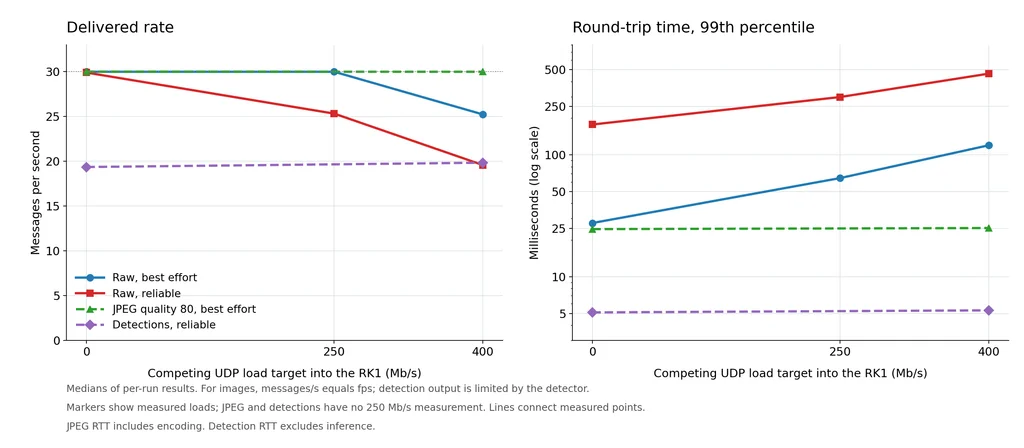
Delivered message rate and 99th-percentile round-trip time under competing UDP traffic: raw streams slow down and gain latency, while JPEG and detections remain nearly unchanged.
The latency panel uses a logarithmic scale. Markers show measured loads; JPEG and detections were not tested at 250 Mb/s. JPEG RTT includes encoding, while detection RTT excludes inference. Lines connect the measured points.
Raw images lost rate and gained delay
Best effort maintained 30 fps at 250 Mb/s of competing traffic, but median RTT rose from 26.7 to 63.9 ms. At 400 Mb/s, the link could not carry both the competing traffic and roughly 680 Mb/s of raw video. The highest measured NIC receive rate was 983.6 Mb/s, close to the port’s capacity.
Reliable raw had much higher p99 latency: 177.4 ms even on the idle link and 463.9 ms at 400 Mb/s load. At idle, its NIC receive rate was about 23% above its unique image payload, compared with about 2% for best effort. We did not classify the packets, so the extra bytes cannot be split between retransmissions and protocol traffic.
Received counts were within one message of completed publications in every loaded best-effort run. The main limitation was slower publication: at 400 Mb/s load, its median publish call took 38.9 ms, longer than the 33.3 ms frame interval. This behavior depends on our single-threaded timer publisher. A camera driver with a different threading or buffering design may drop frames instead.
The competing UDP stream reported 0.0% lost datagrams in all 12 loaded raw runs. We did not collect switch flow-control counters, so the layer responsible for slowing the sender remains unknown.
JPEG and detections held their rates
At 400 Mb/s load, their RTT figures rose by no more than 0.5 ms and delivery rates changed by less than 3%. These streams needed little bandwidth compared with the available link capacity.
For a preview, a recent frame is usually more useful than an old frame recovered later. Best effort is a reasonable starting point, but measure both delivery rate and message age. Reliable delivery can suit small detection or command messages; it does not guarantee that they arrive before a deadline.
Recording on the RK1
Recording to the RK1’s NVMe keeps storage work off the Jetson, but the recorder adds subscribers and can increase network traffic. Include it when testing the complete application.
Once detections, intents and the compressed preview are publishing, they can be recorded together. First check that the intended NVMe mount exists:
mountpoint -q /mnt/nvme && mkdir -p /mnt/nvme/rosbags
If that command fails, fix the mount or use its actual path before recording. Use a new output directory for each bag:
ros2 bag record --storage sqlite3 \
  -o /mnt/nvme/rosbags/vision-check \
  /detections /planner/intent /camera/image_raw/compressed
After stopping the recorder, inspect the topic counts:
ros2 bag info /mnt/nvme/rosbags/vision-check
A bag file existing does not prove that all topics were recorded. For playback, first stop live publishers or use an isolated ROS domain so live and recorded messages do not mix:
ros2 bag play /mnt/nvme/rosbags/vision-check
We ran the replay test three times with the RK1 decision node and recorder configured. Detection delivery ranged from 19.17 to 19.38 messages/s, with a median of 19.23. Median RTT was 2.2 ms and p99 was 6.8 ms. These measurements describe message delivery with the added workload; they do not verify recording completeness or NVMe write performance.
A recorded detection stream lets you test decision logic without rerunning the model. To test a different perception model, recorded JPEG images can be decoded and replayed instead. They are lossy reconstructions, so retain a suitable source recording if exact image fidelity matters.
Live camera capture and transfer
In one 60-second live test, an OpenCV CAP_V4L2 publisher sent 1,258 bgr8 frames to the RK1 at 20.95 fps. The RK1 received every frame, with no gaps or duplicates. The camera negotiated MJPEG at 1280 × 720 and 30 fps, but the complete capture-and-publish path delivered a lower rate.
This test confirmed live capture and network transfer. The complete live workflow combining capture, detection, decision logic and recording was not successfully validated.
OpenCV provided a working capture path for this setup. With the same camera, v4l2_camera 0.7.3 could not decode MJPEG, while usb_cam 0.8.1 produced no messages on its compressed topic. We did not verify the latter’s raw output.
Exposure can reduce the frame rate
Two separate 300-frame V4L2 captures averaged 28.6 and 15.6 fps, including startup. Their exposure values were 333 and 666. V4L2 expresses these values in units of 100 µs, giving exposure times of 33.3 and 66.6 ms, consistent with roughly 30 and 15 fps.
Dynamic frame rate was enabled, allowing longer exposures to reduce capture speed. The exposure readings suggest this explains the difference, but lighting was not measured. Both checks used automatic exposure, automatic white balance and the camera’s 60 Hz power-line setting. If live capture is slower than expected, check lighting and exposure before changing ROS or network settings.
Limits of the results
The main comparison used one 300-frame clip replayed from memory. Different scenes can change JPEG size, detection counts and processing speed. The approximately 19.4 messages/s detector output applies to this FP32 PyTorch configuration; it is not a limit for the Orin Nano. Detection accuracy was not evaluated.
The tests measured message delivery and round-trip time, not the full delay from camera capture to a decision. JPEG timing includes encoding, while detection timing excludes inference. The complete live workflow and recording completeness remain unverified.
The background traffic was fixed-rate UDP. Bursty traffic, additional subscribers, different publishers or other DDS settings may produce different results.
Available temperature logs showed peak readings of 62 to 65 °C on the Jetson and about 55 to 57 °C on the RK1. Estimated room temperature was 25 to 27 °C. Thermal monitoring did not cover every test condition, and throttling status was not recorded.
Troubleshooting
| Symptom | First checks |
| Camera not detected | Board slot and USB port, lsusb -t, then V4L2 device enumeration |
| Live capture below the expected frame rate | Lighting and exposure, then USB bandwidth |
| Raw works but JPEG does not | Republisher, compression plugin, topic name, QoS and active subscription |
| Nodes cannot discover each other | Domain ID, middleware, addresses, interface profile and multicast connectivity |
| Large-image throughput is unexpectedly low | Compare sender TX with receiver RX for duplicate traffic; check the DDS interface configuration |
| Topic exists but no messages arrive | Source output and publisher/subscriber QoS compatibility |
| Command-line tools report low fps | Whether the measuring subscriber can keep up; compare sender and receiver counts |
Check capture, inference, compression, transfer and recording separately. Seeing a topic in the ROS graph confirms discovery, not successful delivery.
What to send between the nodes
| What the receiver needs | What to send |
| Object locations and classes for decision logic | Detection messages |
| An operator preview | JPEG images |
| Image data without another lossy encoding step | Raw images, at a resolution and rate that fit the full network workload |
| Data for later analysis | Detections and intents, plus images when the analysis needs them |
Conclusion
The results support a practical way to split vision work across Turing Pi 2.5: process images on the Jetson, send detections to the RK1 for decision logic, and use JPEG when someone needs a preview.
For this clip, JPEG reduced image payload bandwidth by 97.7% while maintaining about 30 fps under 400 Mb/s of competing traffic. Detection messages used just 0.55 Mb/s on the idle link at about 19.4 messages/s, and their p99 transport RTT stayed near 5 ms under load. That leaves far more network capacity for other services than sending raw images between nodes.
Turing Pi 2.5 brings the Jetson, RK1 modules, network switch and per-node storage together in one compact system. This makes it convenient to keep GPU work on the Jetson while other nodes handle decisions and supporting services. The tests show that the board’s Gigabit network can support this split when each node receives the data it needs.
That also gives us a clear question for a future article: how does this layout perform with a live camera when capture, inference, decisions and recording run together? Measuring the full camera-to-decision delay and checking recorded output would take this transport comparison into a complete application.
Related articles
- NVIDIA Jetson Orin Nano Super on Turing Pi 2.5: Complete Setup Guide
- Run Ollama on Jetson Orin Nano with Turing Pi 2.5
- What LLMs Actually Fit on a Jetson Orin Nano 8GB?
- Jetson Orin Nano Dev Kit vs Turing Pi 2.5
Technical references
- ROS 2 Jazzy platforms and support
- ROS 2 QoS concepts
- ROS 2 discovery configuration
- NVIDIA JetPack components
- V4L2 camera controls
- ROS 2 bag recording and playback
FAQ
How much bandwidth does raw 720p30 video need in ROS 2?
RGB8 needs 663.6 Mb/s of image payload. Our receiving NIC measured 678.6 Mb/s including overhead. Other pixel encodings and frame rates have different requirements.
Can I send raw 1080p video over Gigabit Ethernet?
Not at 30 fps in RGB8: that needs about 1,493 Mb/s before overhead. Lower frame rates may fit. Our publisher delivered 18.0 fps in the 1080p test.
Should camera images use best effort or reliable QoS?
Best effort produced lower transport delays here, particularly under load. Reliable may recover lost data at the cost of added delay. Choose based on whether the receiver values freshness, completeness or both.
Why did the best-effort publisher slow down under load?
Our single-threaded publisher spent longer in each publish call, so it produced fewer messages. Received counts were within one message of completed publications in every loaded best-effort run. Other publisher designs may behave differently.
Do I need Isaac ROS or Turing Pi to use this approach?
Neither is required. This test used ROS 2 Jazzy without Isaac ROS. Turing Pi housed the Jetson, RK1 modules and network switch; separate machines can run the same arrangement.