
In our Jetson Orin Nano 8GB benchmarks, Qwen3 1.7B processed prompts at 1,408 tokens per second but generated answers at about 39 tokens per second. Both numbers came from the same model and device. They measured different work.
Understanding that difference helps explain why a local LLM can respond quickly to a short question yet pause for a long time before answering a document. It also explains why memory capacity, memory bandwidth and compute specifications answer different questions.
The short answer: processing a substantial prompt, called prefill, often depends heavily on compute performance. Generating an answer one token at a time, called decode, often depends heavily on memory bandwidth for a single user. The workload must first fit in memory, and longer context, concurrent requests and runtime implementation can change which limit matters most.
Our Jetson benchmarks and RK1 benchmarks put numbers behind these explanations.
Prefill vs decode: why the speeds differ
A token is a piece of text, sometimes a word and sometimes part of one. The model’s weights are the numerical values learned during training. Inference uses those weights to process input and generate output.
Prefill processes the input together
The input includes your message, instructions, conversation history and any retrieved documents. During prefill, many input tokens can be processed together. The processor can reuse weights across a larger calculation, making efficient computation especially important.
The model also builds a key-value cache, or KV cache, containing attention information from the input. This lets it reuse that information when generating the answer.
Decode advances the answer one token at a time
In ordinary autoregressive generation, each new output token depends on the tokens before it. A single conversation therefore advances sequentially, repeatedly using the weights and cached context.
A large model’s weights do not all fit in the processor’s small, fast on-chip caches. Reading them from main memory for each step can take longer than the calculations themselves. That is why bandwidth often limits single-user decode, as NVIDIA explains in its inference optimization guide.
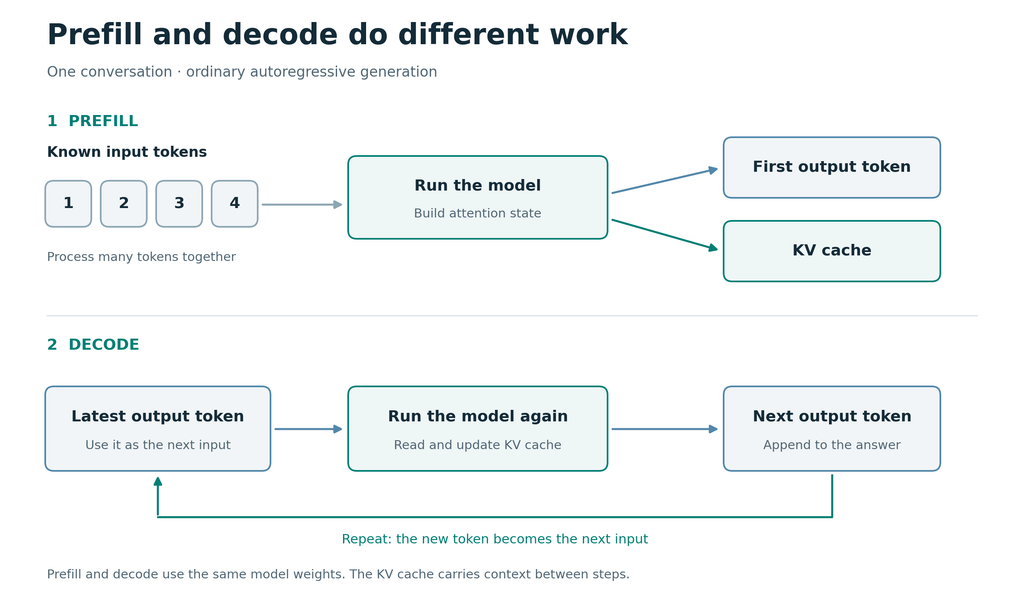
Prefill can process many known input tokens together. Ordinary decode follows a dependency chain: each generated token becomes input to the next step.
Which measurement describes the wait?
| Measurement | What it tells you |
| Model load time | How long the runtime takes to prepare a model that is not already loaded. |
| Time to first token, or TTFT | The wait after submitting a request before output starts, including any queueing, loading and prompt processing. |
| Prefill throughput | Input tokens processed per second. |
| Decode throughput | Output tokens generated per second once generation starts. |
A fast decode result does not guarantee a short initial wait. Our inference-versus-training article explains why both latency and throughput matter when running a service.
Memory capacity and memory bandwidth are different limits
Capacity, measured in GB, determines how much data memory can hold. Bandwidth, measured in GB/s, describes how quickly data can move. A machine can hold a large model yet read its weights too slowly for responsive generation.
The model file is only part of the capacity requirement. Working buffers, the KV cache, the operating system and other applications need space too.
Once the workload fits, compare the time needed for computation with the time needed to move data. The slower of the two sets a theoretical lower bound on execution time, before other overheads. The JAX Scaling Book explains this relationship. A peak TOPS figure alone cannot predict model speed; our local AI introduction covers that hardware terminology.
Estimate LLM tokens per second from memory bandwidth
For a dense model, which uses most of its weights for each token, a rough single-sequence estimate is:
Decode tokens/s ≈ memory bandwidth in GB/s ÷ weight data read per token in GB
This assumes roughly one read of the weights from main memory per generated token. It leaves out KV-cache traffic, computation and runtime overhead. The JAX inference chapter develops the fuller model.
GGUF is a model-file format used by llama.cpp. Its file size can approximate weight size, but is not identical to runtime memory traffic. Quantization stores weights with fewer bits: Q4_K_M is a format based mainly on 4-bit weights, with some tensors stored at higher precision. It does not mean every value occupies exactly four bits.
Jetson estimate versus measured decode
NVIDIA lists a 102 GB/s peak for the Orin Nano Super configuration. We use that specification for an optimistic calculation. Our runs used the 25W profile; their actual memory-controller clock and sustained bandwidth were not established by this analysis.
| Model, all Q4_K_M | GGUF size | 102 GB/s ÷ file size | Measured decode |
| Qwen3 1.7B | 1.11 GB | 91.9 tok/s | 39.42 tok/s |
| Qwen3 4B custom Instruct | 2.50 GB | 40.8 tok/s | 19.53 tok/s |
| Qwen3 8B | 5.03 GB | 20.3 tok/s | 12.64 tok/s |
The measured column contains five-run means from llama-bench, llama.cpp’s benchmark tool. Its pp512 test processes 512 prompt tokens; its separate tg128 test generates 128 tokens. The table uses tg128, while the opening 1,408-token/s result comes from pp512.
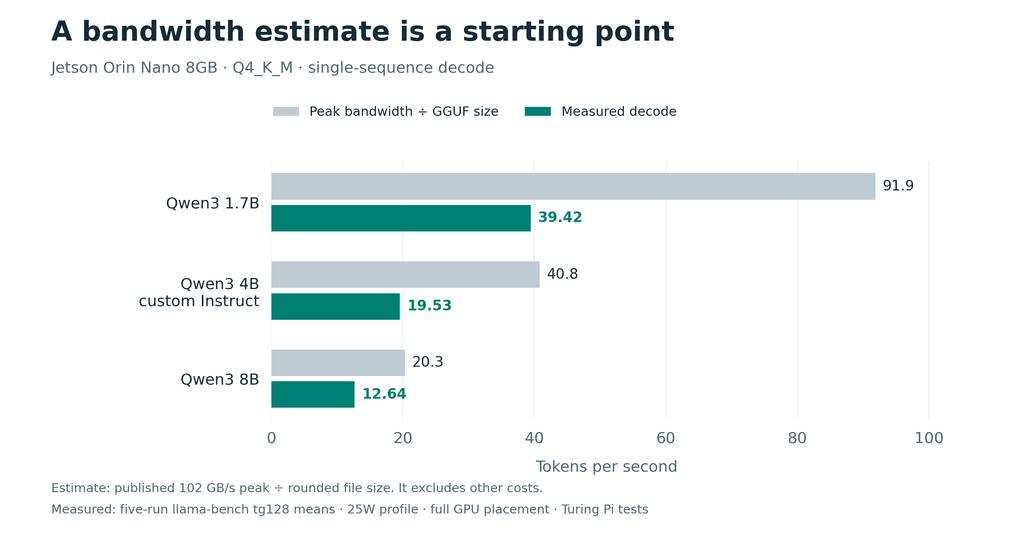
The measured bars show five-run decode averages. The estimates use peak bandwidth divided by rounded file size.
These tests ran on Turing Pi 2.5 using llama.cpp’s CUDA backend, with all logged model layers placed on the GPU. The configured context limit was 4,096 tokens; it was not a filled 4,096-token prompt. The KV cache used FP16, meaning 16-bit floating-point values.
The larger models decoded more slowly, as the estimate suggests. Their measured speeds were approximately 43%, 48% and 62% of the estimates, respectively, so the relative gap narrowed across these three models. Those percentages are not bandwidth-utilization measurements: file size is a proxy, the peak may not be sustained, and computation and other traffic still cost time.
Use the formula to assess plausibility, then look for a benchmark matching the model, runtime and context you intend to use.
KV cache size formula: why longer context costs more
For a conventional full-attention transformer, the cache for one sequence can be estimated as:
KV bytes = 2 × layers × KV heads × head dimension × bytes per element × cached tokens
Keys and values account for the factor of two. KV heads are the groups of key/value vectors in each attention layer; head dimension is the number of values in each vector. The formula counts the cache tensors before allocation overhead.
The Qwen3 8B configuration has 36 layers, eight KV heads and a head dimension of 128. With two-byte FP16 elements:
2 × 36 × 8 × 128 × 2 = 147,456 bytes per token, or 144 KiB
That gives 576 MiB at 4,096 tokens and 1,152 MiB at 8,192 tokens, matching the allocations in our Jetson tests. Doubling context doubled this cache allocation without changing the weights. Sliding-window attention and other architectures can change cache growth, as described in the Hugging Face cache documentation.
Reserved context is different from filled context
A runtime may reserve a large cache for a short prompt. The configured limit therefore affects capacity, while the actual cached history determines how much context full attention works through. Longer history adds cache reads and attention computation, which can slow generation. NVIDIA’s long-context attention analysis explains this growing cost.
Our longer requests show why short decode tests do not describe every workload:
| Model | Short tg128 benchmark | Input tokens in longer request | Longer-request decode |
| Qwen3 1.7B Q4_K_M | 39.42 tok/s | 32,585 | 13.21 tok/s |
| Qwen3 8B Q4_K_M | 12.64 tok/s | 8,010 | 10.50 tok/s |
The short results are five-run microbenchmark means; each longer configuration completed three requests. These are different measurement methods, and system swap was in use during the context sweep. The comparison shows practical workload differences, not the isolated cost of KV-cache growth.
Long input also delays the first answer. Qwen3 1.7B processed the 32,585-token prompt at a reported mean of 787.2 tokens/s. Dividing the token count by that rate gives roughly 41 seconds for prompt processing, excluding the rest of the request.
Choose enough context for the task and remove irrelevant input. Weight quantization and cache precision are separate settings: our Q4 models still used an FP16 cache. Cache quantization can reduce memory needs where supported, but its speed and quality effects need checking.
Q4 vs Q8: faster generation can mean slower prefill
Smaller weights reduce memory use and potential data movement, but each quantization format follows its own execution path. The smallest file does not necessarily win every stage.
In our published RK1 tests, Qwen2.5 1.5B produced this result. Q8_0 uses an 8-bit weight representation:
| Quantization | Time to process 1,024 prompt tokens | Decode throughput |
| Q4_K_M | 18.77 s | 22.57 tok/s |
| Q8_0 | 12.39 s | 15.26 tok/s |
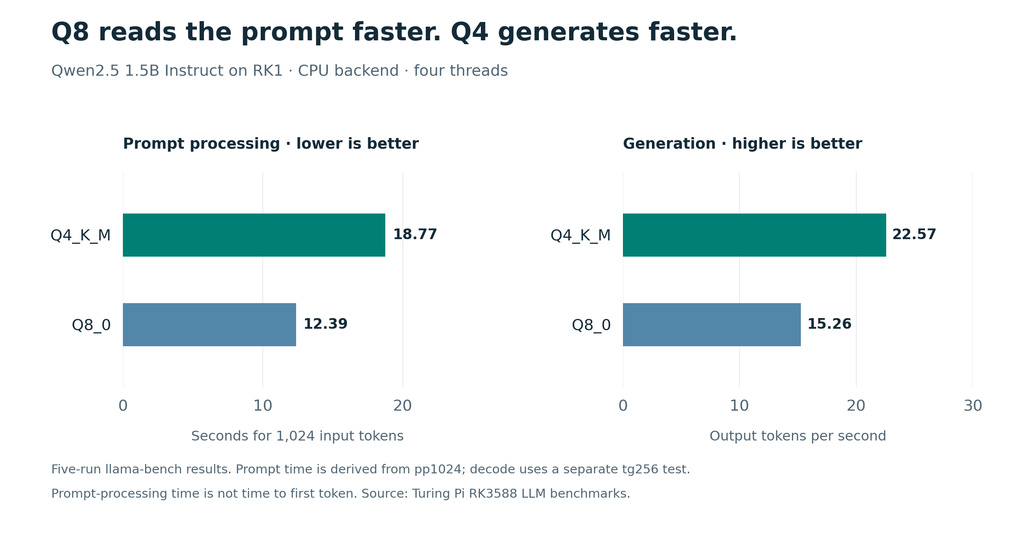
Q8_0 led prompt processing; Q4_K_M led generation. Prompt time is derived from throughput and is not time to first token.
These were five-run tests on an RK1 with 32GB RAM, using the CPU backend and four threads. Prompt processing used pp1024; generation used the separate tg256 test, for 1,024 input and 256 generated tokens respectively.
The Q4 decode advantage is consistent with reduced weight traffic. The prompt results also depend on the runtime’s optimized operations, or kernels. We did not profile them to establish the exact cause of Q8’s prefill advantage.
For an application with long inputs and short answers, prefill deserves particular attention. For longer generated answers, decode becomes more important. Compare both stages and check answer quality before choosing a format.
Unified memory does not guarantee equal LLM performance
Apple silicon, Jetson, AMD Ryzen AI Max systems and NVIDIA DGX Spark let the CPU and GPU share physical memory. They still differ in capacity, bandwidth, processor design and software support.
| Platform example | Published memory bandwidth |
| Jetson Orin Nano Super configuration | Up to 102 GB/s |
| AMD Ryzen AI Halo, Ryzen AI Max+ 395 configuration | 256 GB/s |
| NVIDIA DGX Spark | 273 GB/s |
| Apple M4 Pro | 273 GB/s |
| Apple M4 Max | Up to 546 GB/s |
These manufacturer specifications are not an LLM performance ranking. Exact configuration matters, including the M4 Max variant, and some RAM must remain available to the operating system and other workloads.
Shared memory does not make CPU execution as fast as GPU execution
Moving layers to the CPU on Jetson changes where they execute; it does not create another memory pool. NVIDIA’s CUDA for Tegra documentation explains the shared physical memory and its management.
Our Qwen3 8B request tests generated 12.23 tokens/s with full GPU placement and 5.85 tokens/s with 24 of 37 logged layers on the GPU. Each configuration completed three requests at a 4,096-token context setting.
Partial placement reduced the logged GPU model buffer but more than halved decode speed. Successful loading therefore does not prove the model is using the execution path you intended. Check the placement logs.
MoE models: total parameters vs active parameters
A mixture-of-experts, or MoE, model routes each token through a subset of its experts. For example, Qwen3-30B-A3B has 30.5 billion total parameters and 3.3 billion activated parameters per token.
Fewer active parameters can reduce per-token work, but this does not give the model the capacity requirement of a dense 3.3B model. The runtime needs access to all its weights, either resident in memory or through an offloading strategy, because different tokens can select different experts.
Use the actual model size to assess capacity. Active parameters help describe work per token. The dense-model estimate above cannot simply divide bandwidth by the entire MoE file size, because it would assume every weight is read for every token.
Caching and concurrent users change the result
A loaded model is different from a cached prompt
Keeping a model loaded avoids another cold start. Reusing a processed prompt prefix avoids some prefill work. These are separate advantages.
In our repeated-prompt Ollama and llama.cpp tests, the runtimes reused 511 of 512 input tokens. The warm TTFT results therefore described cached requests, not fresh 512-token prompts. As the vLLM documentation explains, prefix caching saves applicable prompt processing, not output-generation work.
Total throughput is different from each user’s speed
Batching several conversations can reuse weights across multiple sequences and raise total server throughput. It can also change per-user speed and queueing time, while each conversation needs cache space.
Measure both aggregate throughput and per-user latency when sizing a shared service. Also distinguish concurrent users from prompt-processing batch size: a llama.cpp batch setting of 512 does not mean 512 simultaneous users. The llama-bench documentation defines these options.
What to check when a local LLM feels slow
| Symptom | First checks |
| Long delay on the first request only | Separate model loading from prompt processing; check whether the model stays loaded. |
| Long delay after submitting a document | Check uncached input length and prefill speed. Remove irrelevant material. |
| Output starts quickly but arrives slowly | Check decode speed, model size, quantization and CPU/GPU placement. |
| A long conversation becomes slower | Check actual context length, cache growth and memory pressure. |
| Several users make the service sluggish | Measure queueing, per-user latency and cache use under concurrent requests. |
| Results differ from a benchmark | Match the model file, backend, context, cache state and power settings. |
NVMe helps store and load models. Once weights and working data are resident in RAM, normal decode depends on memory access and computation. Storage-backed paging introduces a different bottleneck.
On Turing Pi 2.5, application services, databases or logging can run on other nodes, reducing competition for the Jetson’s memory. The nodes retain separate memory, and the carrier does not accelerate the Jetson GPU. Our distributed ROS 2 article demonstrates dividing application work across nodes.
Measurement limits
The Jetson and RK1 examples use different models, backends and test lengths, so they are not a device-to-device performance comparison. The measurements establish throughput for the tested configurations, not answer quality or long-term service capacity. Jetson clocks were not locked, and the runs were not a sustained thermal-soak test.
Conclusion
Separate three questions when choosing a local LLM setup: does the workload fit, how long does input processing take, and how quickly does the answer arrive? That makes hardware specifications and benchmark results much easier to use.
Our 8GB Jetson ran Qwen3 1.7B at about 39 tokens/s in the short decode test and also ran Qwen3 8B with full GPU placement. The smaller model provides a faster starting point; the larger model is available when its answers better suit the task.
Start with a model that answers your task well, give it the context it needs, and measure both initial latency and generation speed. A future article will examine concurrent requests and what it takes to keep that local service responsive for several users.
Related articles
- What LLMs Actually Fit on Jetson Orin Nano 8GB?
- LLM Inference Benchmarks on RK3588
- AI Is Becoming an Inference Problem
- Run Ollama on Jetson Orin Nano with Turing Pi 2.5
FAQ
Is memory bandwidth or compute more important for LLM inference?
For substantial prompts, prefill often makes compute especially important. For single-user dense-model decode, moving weights often makes bandwidth the main constraint. Context length, batching and implementation can change the balance.
Does more RAM increase LLM tokens per second?
It helps when insufficient capacity causes paging or prevents the workload from fitting. Once the workload fits, extra capacity alone does not guarantee faster generation.
Why can Q8 process prompts faster than Q4?
Each format uses different numerical representations and optimized operations. Smaller weights can favor decode while another format processes prompts more efficiently, as our RK1 results demonstrate.
Does increasing the context limit always slow generation?
A larger limit may reserve more memory without filling it. Actual input length and cached history determine much of the additional processing work.
Will a faster SSD improve LLM generation speed?
It can help loading. When the model and its working data are resident in RAM, faster storage does not directly increase normal decode throughput.