
If you’ve already deployed Ollama or llama.cpp on an RK1 node, getting an LLM running is no longer the challenge. The harder question is whether you’re running it efficiently. Should you choose Q4_K_M or Q8_0? How much generation speed do you lose as model size increases? And how much memory does each quantization actually consume during inference?
This RK3588 LLM inference benchmark answers those questions using repeatable measurements instead of isolated tokens-per-second screenshots. Four instruction-tuned models ranging from 1.5B to 7B parameters are tested across Q4_K_M, Q5_K_M, Q6_K, and Q8_0 using llama.cpp on the RK3588 CPU.
Every model is tested with the same prompt-processing workload, generation length, CPU thread count, repetition count, and storage setup. The results compare prompt-processing performance, generation throughput, and peak process memory across 16 model and quantization combinations.
By the end, you’ll know which GGUF quantization offers the best balance of speed and memory usage, which model sizes remain practical on RK3588 hardware, and whether an 8GB, 16GB, or 32GB RK1 is the right fit for your workload. NPU inference with RKLLM, including model conversion and benchmarking, will be covered separately in a dedicated follow-up article.
Prerequisites: This guide assumes you already have Ollama or llama.cpp running on your RK1. It focuses on benchmarking and performance analysis rather than installation or prompt engineering. If you haven’t configured your environment yet, start with our guide to running LLMs locally on ARM using Ollama and llama.cpp.
Part 1: Test Setup and Methodology
To keep every result directly comparable, all benchmarks use the same RK1 module, operating system, NVMe storage, workload size, CPU thread count, and repetition count. The only variables between runs are the model and GGUF quantization format.
All models were tested with four CPU threads. Preliminary thread-scaling tests showed that four threads produced substantially better token-generation performance than eight threads on the RK3588, even though eight threads slightly improved prompt-processing throughput in some cases.
Hardware and Software
Hardware: RK1 module with 32GB of RAM
Operating system: Ubuntu 22.04 ARM64
Model storage: NVMe SSD
Inference backend: llama.cpp llama-bench
llama.cpp build: 10134, commit 42fc24306
The 32GB RK1 was used so every tested model and quantization could be loaded on the same system. Peak process memory was measured for each configuration so the practical requirements of the 8GB and 16GB RK1 variants could be evaluated from observed memory usage rather than model file size alone.
Models
Four instruction-tuned models ranging from 1.5B to 7B parameters were included:
- Qwen2.5-1.5B-Instruct
- DeepSeek-R1-Distill-Qwen-1.5B
- Llama-3.2-3B-Instruct
- Qwen2.5-7B-Instruct
This selection includes two closely related 1.5B models, a 3B model from a different architecture, and a larger 7B model that places substantially greater demands on memory bandwidth and system RAM.
GGUF Quantization Formats
Each model was tested using the following GGUF formats:
- Q4_K_M
- Q5_K_M
- Q6_K
- Q8_0
These formats provide a useful range from smaller, more aggressively quantized models to larger representations that retain greater numerical precision but require more memory and memory bandwidth.
Benchmark Workload
CPU performance was measured using llama-bench with two synthetic workloads:
pp1024: Processes a sequence of 1,024 synthetic prompt tokens.tg256: Generates 256 tokens autoregressively.
The synthetic workload avoids differences caused by prompt wording and tokenization, making repeated comparisons between models and quantization levels easier to reproduce.
pp1024 reports prompt-processing throughput in tokens per second. The time required to process the complete 1,024-token sequence is calculated as:
Prompt processing time = 1024 ÷ pp1024 throughput
Part 2: Benchmark Limitations
These results provide a consistent comparison on one 32GB RK1 system, but they should not be treated as universal performance guarantees.
llama-benchuses syntheticpp1024andtg256workloads, so real chat performance may vary with prompt length, context size, and sampling settings.- Prompt-processing time represents the time required to process 1,024 tokens, not true end-to-end time to first token.
- Peak memory reports process RSS rather than total system memory usage.
- Memory usage and throughput may change with longer context windows.
- Model quality and the effect of quantization on output accuracy are outside the scope of this benchmark.
With those limitations established, the next section compares the measured performance of each model and quantization format.
Part 3: Benchmark Results Overview
The table below summarizes all 16 benchmark configurations, including prompt-processing time, generation throughput, and peak process memory across each model and GGUF quantization format.
All results were collected using the methodology described in Part 1. The sections that follow examine the most important performance and memory trends, while this table serves as the complete benchmark reference.
| Model | GGUF Quantization | Prompt Processing Time (s) | Tokens/sec | Peak Process RSS (MiB) |
| Qwen2.5-1.5B-Instruct | Q4_K_M | 18.77 | 22.57 | 2021.54 |
| Qwen2.5-1.5B-Instruct | Q5_K_M | 20.05 | 16.59 | 2287.06 |
| Qwen2.5-1.5B-Instruct | Q6_K | 21.04 | 16.25 | 2,568.46 |
| Qwen2.5-1.5B-Instruct | Q8_0 | 12.39 | 15.26 | 3,281.23 |
| DeepSeek-R1-Distill-Qwen-1.5B | Q4_K_M | 18.80 | 22.78 | 2,061.84 |
| DeepSeek-R1-Distill-Qwen-1.5B | Q5_K_M | 20.07 | 16.58 | 2,354.81 |
| DeepSeek-R1-Distill-Qwen-1.5B | Q6_K | 21.03 | 16.41 | 2,665.99 |
| DeepSeek-R1-Distill-Qwen-1.5B | Q8_0 | 12.31 | 15.24 | 3,432.90 |
| Llama-3.2-3B-Instruct | Q4_K_M | 40.09 | 11.25 | 4,085.98 |
| Llama-3.2-3B-Instruct | Q5_K_M | 42.23 | 8.07 | 4,663.45 |
| Llama-3.2-3B-Instruct | Q6_K | 44.76 | 8.00 | 5,277.09 |
| Llama-3.2-3B-Instruct | Q8_0 | 26.96 | 7.36 | 6,760.65 |
| Qwen2.5-7B-Instruct | Q4_K_M | 89.98 | 5.44 | 8,885.03 |
| Qwen2.5-7B-Instruct | Q5_K_M | 92.84 | 3.79 | 10,272.86 |
| Qwen2.5-7B-Instruct | Q6_K | 103.96 | 3.72 | 11,570.73 |
| Qwen2.5-7B-Instruct | Q8_0 | 68.09 | 3.43 | 15,138.30 |
Throughput Analysis
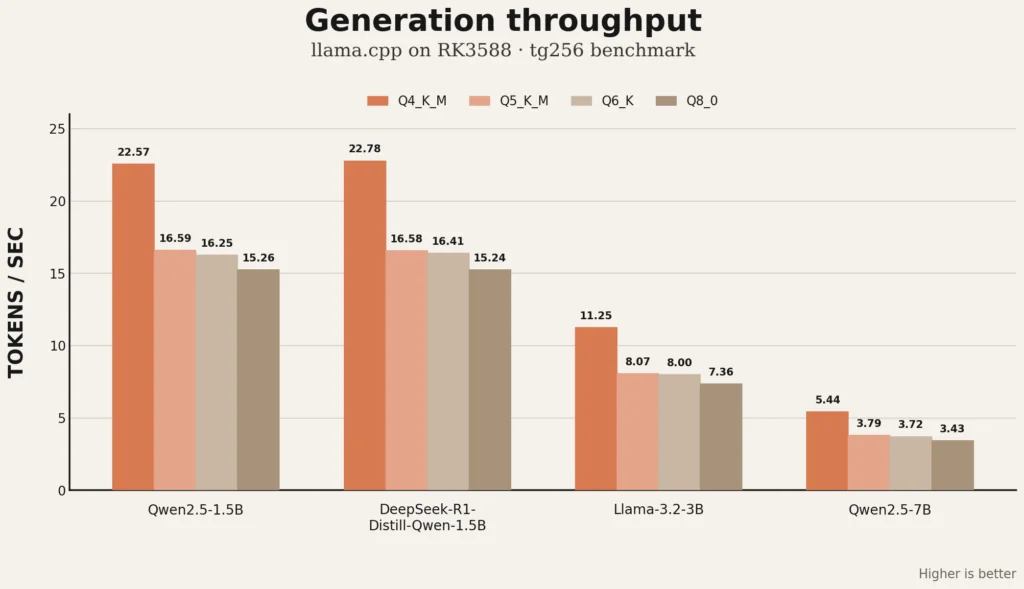
Generation throughput falls predictably as model size and quantization precision increase.
Across every model, Q4_K_M delivers the highest token-generation speed. The advantage is especially clear when compared with Q8_0:
- Qwen2.5-1.5B falls from 22.57 to 15.26 tokens/sec.
- DeepSeek-R1-Distill-Qwen-1.5B falls from 22.78 to 15.24 tokens/sec.
- Llama-3.2-3B falls from 11.25 to 7.36 tokens/sec.
- Qwen2.5-7B falls from 5.44 to 3.43 tokens/sec.
Q5_K_M and Q6_K perform very similarly in most generation tests. On Qwen2.5-1.5B, for example, they reached 16.59 and 16.25 tokens/sec respectively. The same pattern appears with Llama-3.2-3B and Qwen2.5-7B, where the additional precision of Q6_K produces little or no measurable generation-speed benefit.
The clearest scaling trend appears when comparing Q4_K_M across model sizes:
| Model | Q4_K_M generation speed |
| Qwen2.5-1.5B-Instruct | 22.57 tokens/sec |
| DeepSeek-R1-Distill-Qwen-1.5B | 22.78 tokens/sec |
| Llama-3.2-3B-Instruct | 11.25 tokens/sec |
| Qwen2.5-7B-Instruct | 5.44 tokens/sec |
The two 1.5B models perform almost identically, which is expected given their shared Qwen architecture and similar parameter counts. Moving to Llama-3.2-3B roughly halves generation throughput, while the 7B Qwen model reduces it by approximately half again.
For interactive use on RK3588, the 1.5B Q4_K_M models provide the most responsive experience. Llama-3.2-3B remains usable at 11.25 tokens/sec, while Qwen2.5-7B is better suited to workloads where model capability matters more than response speed.
Figure 1. Generation throughput across all tested models and GGUF quantization formats.
Prompt-Processing Performance
Prompt-processing results follow a different pattern from token generation. Q4_K_M is generally faster than Q5_K_M and Q6_K, but Q8_0 produces the fastest pp1024 result across all four models.
This behaviour is consistent across the complete dataset:
- Qwen2.5-1.5B Q8_0 processes the 1,024-token workload in 12.39 seconds.
- DeepSeek-R1-Distill-Qwen-1.5B Q8_0 completes it in 12.31 seconds.
- Llama-3.2-3B Q8_0 completes it in 26.96 seconds.
- Qwen2.5-7B Q8_0 completes it in 68.09 seconds.
Despite this faster prompt processing, Q8_0 remains the slowest format for autoregressive generation. This shows that prompt evaluation and token generation stress the implementation differently, and the fastest format for one stage is not necessarily the fastest for the other.
For most chat-style workloads, generation speed remains the more noticeable metric because users spend more time waiting for output tokens than for a single short prompt to be processed. Applications with long prompts and short outputs may benefit more from Q8_0’s stronger prompt-processing performance.
Memory Footprint
Peak process memory rises steadily with model size and quantization precision.
| Model | Q4_K_M | Q8_0 |
| Qwen2.5-1.5B-Instruct | 1.97 GiB | 3.20 GiB |
| DeepSeek-R1-Distill-Qwen-1.5B | 2.01 GiB | 3.35 GiB |
| Llama-3.2-3B-Instruct | 3.99 GiB | 6.60 GiB |
| Qwen2.5-7B-Instruct | 8.68 GiB | 14.78 GiB |
The 1.5B models fit comfortably on an 8GB RK1 across every tested quantization. Llama-3.2-3B also remains practical on the 8GB module, although Q8_0 leaves much less memory for the operating system and additional services.
Qwen2.5-7B Q4_K_M reached 8.68 GiB of peak process RSS, so it is not a practical fit for an 8GB RK1 under this workload. The 16GB RK1 can run the 7B model through Q6_K with reasonable headroom, while Q8_0 peaks at 14.78 GiB and leaves very little capacity for the operating system, filesystem cache, or other applications.
The 32GB RK1 comfortably accommodates every tested configuration and is the most flexible option for running 7B models alongside other homelab services.
Which Configuration Should You Use?
For most RK3588 deployments, Q4_K_M provides the strongest overall balance of speed and memory use.
- Best responsiveness: Qwen2.5-1.5B or DeepSeek-R1-Distill-Qwen-1.5B at Q4_K_M
- Best middle ground: Llama-3.2-3B at Q4_K_M
- Best capability among the tested models: Qwen2.5-7B at Q4_K_M on a 16GB or 32GB RK1
- Higher precision with moderate overhead: Q5_K_M
- Limited practical advantage: Q6_K, because its generation speed is close to Q5_K_M while using more memory
- Best prompt-processing result but highest memory use: Q8_0
Q5_K_M may be worthwhile when output quality is more important than maximum speed, but the benchmark does not evaluate model-quality differences directly. Q6_K and Q8_0 should therefore be selected only when their additional precision is justified by separate quality testing for the intended workload.
Conclusion
The RK3588 can run modern GGUF language models across a useful range of sizes, but model selection has a much greater effect on responsiveness than small changes between higher quantization levels.
The 1.5B Q4_K_M models deliver approximately 22.6 tokens/sec while using about 2 GiB of peak process memory, making them well suited to responsive assistants and lightweight local services. Llama-3.2-3B provides a stronger middle ground at 11.25 tokens/sec and approximately 4 GiB of peak memory. Qwen2.5-7B runs successfully, but its 5.44 tokens/sec generation rate and 8.68 GiB Q4_K_M memory footprint make a 16GB RK1 the practical minimum.
Across the complete dataset, Q4_K_M is the clearest default recommendation. It delivers the highest generation throughput, the lowest memory usage, and the broadest compatibility across RK1 memory tiers. Higher-precision formats remain available when model-quality testing shows a meaningful benefit, but they impose substantial memory and performance costs on RK3588 hardware.
What’s Next: RK3588 NPU Inference with RKLLM
This article focuses on GGUF inference with llama.cpp on the RK3588 CPU. A follow-up article will cover the NPU path in depth using RKLLM.
That guide will walk through the complete workflow:
- downloading the original Hugging Face checkpoint
- installing RKLLM Toolkit on an x86_64 system
- converting the model to W8A8 and W4A16
- exporting and transferring the
.rkllmmodel to the RK1 - configuring the RKLLM runtime and NPU driver
- running repeatable NPU benchmarks
- comparing NPU performance, memory use, and deployment complexity against llama.cpp
Keeping the NPU workflow separate allows the conversion process, runtime requirements, and benchmark methodology to be covered properly rather than compressed into a small section here.
Troubleshooting Benchmark Results
Tokens/sec varies noticeably between repeated runs:
Check for background CPU activity, thermal throttling, or a different CPU governor. Rerun the benchmark only after the system is idle and use the same -p 1024 -n 256 -t 4 -r 5 configuration.
Generation speed is lower with eight threads than four:
This is expected on the RK3588 for the tested models. The four Cortex-A76 performance cores delivered better tg256 results than using all eight CPU cores, while eight threads sometimes improved prompt processing slightly.
Q8_0 reports unusually fast prompt processing:
This behaviour appeared consistently across all four tested model families. Repeat the run to rule out an outlier, but do not assume that faster pp1024 performance also means faster generation. In these tests, Q8_0 produced the fastest prompt processing but the slowest tg256 result.
Peak memory appears much larger than the GGUF file size:
The reported value is peak process RSS, not model file size. It includes resident model pages, runtime buffers, KV-cache allocations, and other memory used by llama.cpp during the benchmark.
Peak RSS changes between reruns:
Small differences are normal because llama.cpp uses memory-mapped model files and resident pages may vary slightly between runs. Large differences usually indicate another process consuming memory or a different benchmark workload.
A model fails to load even though the GGUF file fits in RAM:
The operating system, filesystem cache, and other services also require memory. Leave sufficient headroom rather than treating the module’s advertised RAM capacity as fully available to llama.cpp.
Prompt-processing time looks implausibly low:
Confirm that the value was calculated as 1024 ÷ pp1024 throughput. This is the time required to process the complete 1,024-token synthetic prompt, not true end-to-end time to first token.
A benchmark slows down after several consecutive runs:
Check the SoC temperature and allow the board to return close to its normal idle temperature before repeating the test. Sustained workloads can reduce clock speeds even when the model initially runs at full performance.
Related Articles
- Run LLMs Locally on ARM with Ollama and llama.cpp Set up the llama.cpp and Ollama environment used as the foundation for these benchmarks.
- RK1 Benchmarks: CPU, Memory, Storage, and Thermal Performance See the broader hardware performance characteristics of the RK1 and RK3588 platform.
- Whisper.cpp and Piper TTS on ARM64 with RK3588 Explore local speech recognition and text-to-speech workloads on the same hardware.
- ARM Compute Module Buyer’s Guide 2026 Compare RK1 with other ARM compute modules for local AI and homelab workloads.
- Turing Pi 2.5 and RK1 Complete Setup Guide Start from initial hardware setup before deploying local inference workloads.
FAQ
Why is prompt-processing time different from generation throughput?
Prompt processing measures how quickly llama.cpp evaluates the input sequence before generation begins. Generation throughput measures how quickly the model produces tokens autoregressively afterward. A quantization can perform well during prompt processing but poorly during generation, which is exactly what happened with Q8_0 in these tests.
Are the prompt-processing results the same as time to first token?
No. The reported value is calculated from the pp1024 throughput and represents the time required to process the complete 1,024-token synthetic prompt. It does not include application overhead, model loading, tokenization, or the time required to emit the first generated token.
Why was Q8_0 faster at prompt processing but slower at generation?
Prompt evaluation and autoregressive generation use different execution patterns. Across all four tested models, Q8_0 produced the fastest pp1024 results but the slowest tg256 generation throughput. The benchmark confirms that the fastest quantization for prompt processing is not necessarily the fastest for interactive generation.
Why does Q4_K_M perform better than the higher-precision formats?
Q4_K_M stores model weights using fewer bits, reducing the amount of data that must be moved through memory during inference. On the RK3588, that lower memory-bandwidth demand translated into faster generation and lower peak memory usage across every tested model.
Does a higher-precision quantization always produce better output?
Not necessarily for every prompt or task. Higher-precision formats retain more information from the original model, but the practical quality difference depends on the model and workload. This article measures inference performance and memory usage only, so it does not claim that Q5_K_M, Q6_K, or Q8_0 will produce noticeably better answers than Q4_K_M.
Why is peak process memory larger than the GGUF model file?
The model file is only one part of the memory required during inference. Peak process RSS also includes resident model pages, runtime buffers, KV-cache allocations, and other memory used by llama.cpp while processing and generating tokens.
Can I reproduce these benchmarks myself?
Yes. The article documents the llama.cpp build, model formats, prompt and generation workloads, CPU thread count, repetition count, storage setup, benchmark command, and peak-RSS measurement method used for every configuration.
What is the largest model tested on the RK1?
The largest model in this benchmark is Qwen2.5-7B-Instruct. Its Q4_K_M version generated 5.44 tokens/sec and reached 8.68 GiB of peak process memory. Q4_K_M through Q6_K are practical on the 16GB RK1, while Q8_0 reached 14.78 GiB and is better suited to the 32GB variant.
Which models are practical on an 8GB RK1?
Both tested 1.5B models fit comfortably across every quantization. Llama-3.2-3B also fits, although its Q8_0 configuration reached 6.60 GiB of peak process memory and leaves less headroom for the operating system and other services. For an 8GB RK1, Q4_K_M is the safest default.
Which quantization should I use for most RK3588 workloads?
Q4_K_M is the strongest default based on these results. It delivered the highest generation throughput and lowest peak memory usage across all four models. Q5_K_M is the next option to consider when separate quality testing shows that the added precision is useful for your workload.
Appendix: Reproducing These Benchmarks
All GGUF benchmarks were run with llama.cpp build 10134, commit 42fc24306, using the same workload and thread count:
/usr/bin/time -f '\nPeak RSS: %M kB' \
  ./build/bin/llama-bench \
  -m /path/to/model.gguf \
  -p 1024 \
  -n 256 \
  -t 4 \
  -r 5
Model Sources
The GGUF files used in these benchmarks were downloaded from the following Hugging Face repositories:
- Qwen2.5-1.5B-Instruct-GGUF
- DeepSeek-R1-Distill-Qwen-1.5B-GGUF
- Llama-3.2-3B-Instruct-GGUF
- Qwen2.5-7B-Instruct-GGUF
For each model, the Q4_K_M, Q5_K_M, Q6_K, and Q8_0 files were tested. Hugging Face repositories can change over time, so anyone reproducing the results should also record the exact filename, repository revision, file size, and SHA-256 checksum of each downloaded GGUF file.
For exact reproduction, record the llama.cpp commit, GGUF filename, Hugging Face repository revision, and SHA-256 checksum alongside each result.