
Small language models are reaching the point where running one locally on an ARM board no longer feels like a proof of concept. Liquid AI’s LFM2.5-2.6B is built for efficient on-device inference, and the official GGUF release means it can run directly through llama.cpp without a separate model-conversion workflow.
In this guide, we run the Q4_K_M quantization of LFM2.5-2.6B on a Turing Pi RK1 using CPU-only inference. With four CPU threads and a 4096-token context window, the model reached approximately 30 tokens per second during prompt processing and 14 tokens per second during generation.
That generation speed is fast enough for responsive terminal chat rather than slow, benchmark-only inference. It also raises a more useful question than whether the model can simply load: what can a 2.6B model running locally on the RK3588 actually do?
We will install the model with llama.cpp, measure its performance, and test it on practical workloads including code generation, configuration review, text processing, and private local automation.
Test Setup
The tests were performed with the following configuration:
| Component | Configuration |
| Hardware | Turing Pi RK1 |
| SoC | Rockchip RK3588 |
| Memory | 32GB LPDDR4X |
| Operating system | Ubuntu 24.04 LTS, ARM64 |
| Runtime | llama.cpp |
| Model | LiquidAI/LFM2.5-2.6B-GGUF |
| Quantization | Q4_K_M |
| CPU threads | 4 |
| Context size | 4096 tokens |
| Acceleration | CPU only |
LFM2.5 is a family of compact models developed by Liquid AI for efficient on-device deployment. The 2.6B checkpoint is available as an official GGUF model, allowing llama.cpp to download and run it directly from Hugging Face.
This setup does not use the RK3588 NPU. Inference runs through the RK1 CPU using llama.cpp’s ARM-optimized kernels.
The RK3588 combines four high-performance Cortex-A76 cores with four efficiency-focused Cortex-A55 cores. In our testing, setting llama.cpp to four threads produced better performance than using all eight cores: generation increased from roughly 9 tokens per second with eight threads to approximately 14 tokens per second with four threads.
The likely explanation is that the four-thread configuration keeps the workload concentrated on the faster Cortex-A76 cluster instead of distributing synchronized inference work across both the A76 and slower A55 cores. We will use four threads throughout the rest of this guide.
Part 1: Install and Build llama.cpp
Install the build dependencies
Update the package index and install the compiler, CMake, Git, and OpenSSL development files:
sudo apt update
sudo apt install -y \
  build-essential \
  cmake \
  git \
  libssl-dev
The libssl-dev package allows llama.cpp to use HTTPS when downloading models through the -hf option. Without it, llama.cpp may return:
get_repo_commit: error: HTTPS is not supported
error: --model is required
Clone and compile llama.cpp
Clone the official repository and enter its directory:
git clone https://github.com/ggml-org/llama.cpp
cd llama.cpp
Build llama.cpp in release mode with native CPU optimizations and OpenSSL support:
cmake -B build \
  -DCMAKE_BUILD_TYPE=Release \
  -DGGML_NATIVE=ON \
  -DLLAMA_OPENSSL=ON

cmake --build build -j8
The -j8 option uses all eight RK3588 CPU cores during compilation. It only affects build time and does not control how many threads are used during model inference.
Verify the build
Confirm that the command-line binary was compiled successfully:
./build/bin/llama-cli --version
Record the displayed llama.cpp build or commit if you plan to reproduce or compare the benchmark results. llama.cpp is updated frequently, and inference performance can change between releases.
Part 2: Run LFM2.5-2.6B and Measure Performance
Start an interactive chat session
The official GGUF model can be downloaded and loaded directly from Hugging Face:
./build/bin/llama-cli \
  -hf LiquidAI/LFM2.5-2.6B-GGUF:Q4_K_M \
  -t 4 \
  -c 4096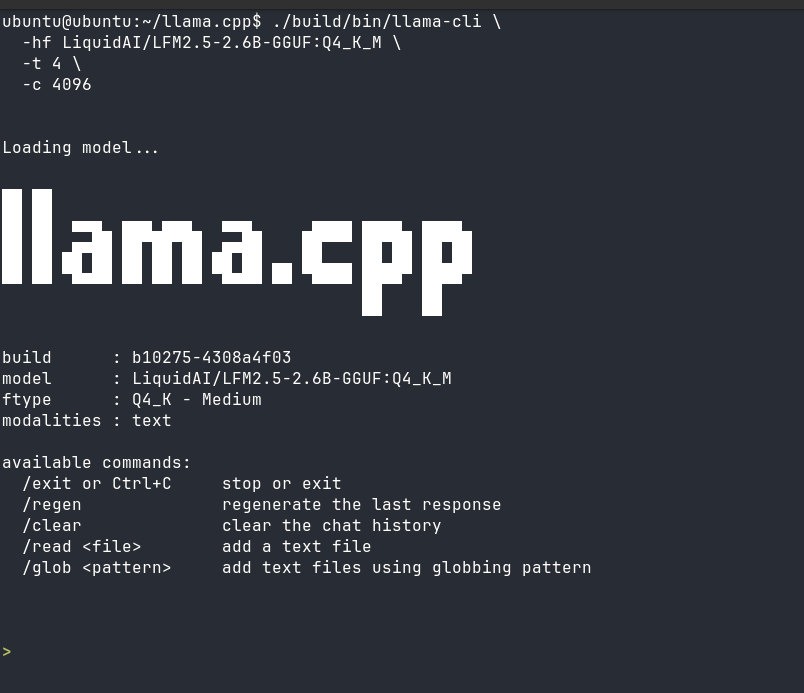
The options used here are:
hf LiquidAI/LFM2.5-2.6B-GGUF:Q4_K_Mdownloads and loads theQ4_K_Mquantization from Hugging Face.t 4uses four CPU threads for inference.c 4096sets the context window to 4096 tokens.
We omit -p so llama.cpp starts in interactive chat mode instead of processing one predefined prompt. We also omit -n, leaving no manually configured output-token limit for the demo.
The model is downloaded only on the first run. Subsequent launches reuse the cached GGUF file unless the cache is removed.
Once loading completes, llama.cpp presents an interactive prompt. You can continue asking follow-up questions within the same session. Use /exit or Ctrl+C to stop it.
Performance on the Turing Pi RK1
With four inference threads, the RK1 produced the following approximate results:
| Metric | Result |
| Prompt processing | 30 tokens/s |
| Token generation | 14 tokens/s |
| CPU threads | 4 |
| Context size | 4096 tokens |
| Quantization | Q4_K_M |
| Acceleration | CPU only |
The four-thread configuration performed considerably better than using all eight RK3588 CPU cores. During the earlier eight-thread test, generation remained close to 9 tokens/s, while reducing the thread count to four increased it to approximately 14 tokens/s.
The RK3588 combines four Cortex-A76 performance cores with four slower Cortex-A55 efficiency cores. Using four threads likely keeps the main inference workload on the faster Cortex-A76 cluster, avoiding synchronization and scheduling overhead across the two different core types.
Prompt-processing results varied slightly between requests because input length, conversation history, and cached context affect the reported speed. Generation performance was more consistent and is the more useful measurement for judging the interactive experience.
At approximately 14 tokens/s, responses stream quickly enough for comfortable terminal chat, code generation, configuration review, text processing, and other short local workloads. The experience feels interactive rather than like a model running only for demonstration or benchmarking.
These results apply to this RK1 configuration, llama.cpp build, model quantization, context size, and thread count. For a controlled comparison, the same prompt and generation settings should be repeated across multiple fresh runs.
Part 3: Test LFM2.5-2.6B on Practical Tasks
Raw throughput only shows how quickly the model generates text. A useful local model must also follow instructions, produce usable output, and handle tasks that make sense on a small ARM system.
Code generation test
For the first practical test, we asked the model to generate a compact Ubuntu system-monitoring script:
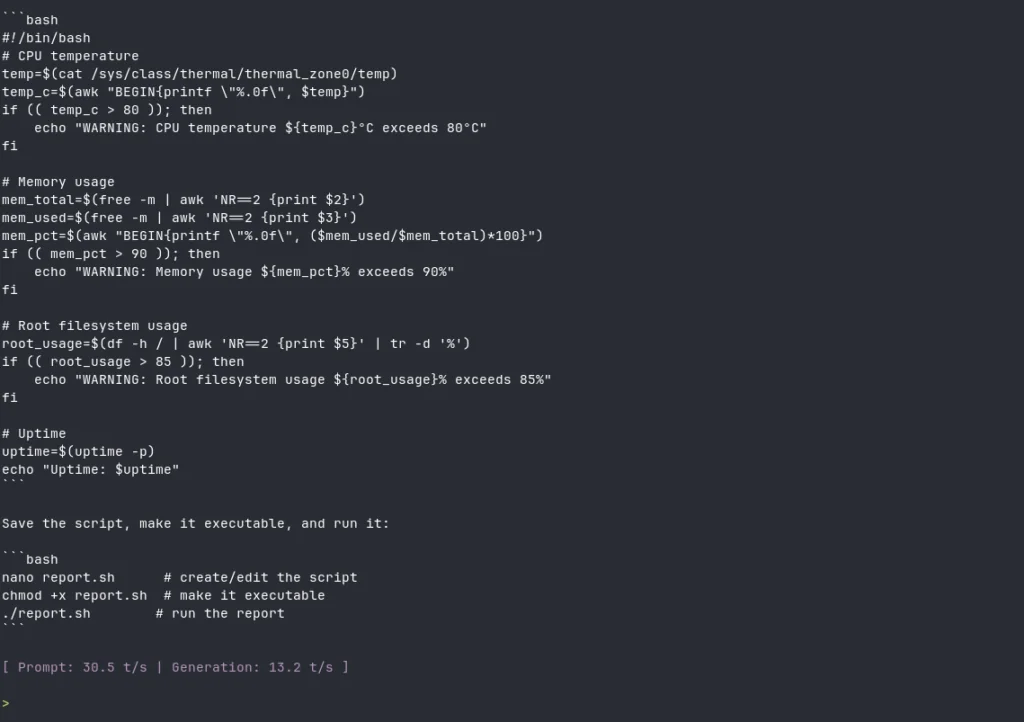
Write a compact Bash script for Ubuntu that reports CPU temperature from /sys/class/thermal/thermal_zone0/temp, memory usage, root filesystem usage, and uptime. Warn above 80°C, 90% memory, or 85% disk usage. Use only standard Ubuntu commands, keep the script under 50 lines, and return only the finished script followed by three commands showing how to save and run it.
The model followed most of the constraints successfully. It returned a Bash script under 50 lines, included the requested warning thresholds, used standard Ubuntu utilities, and provided commands for saving and running the script.
During this response, llama.cpp reported:
| Metric | Result |
| Prompt processing | 30.5 tokens/s |
| Token generation | 13.2 tokens/s |
For a 2.6B model running locally on the RK1, the result was surprisingly capable. The script structure was clear, and the memory, root filesystem, and uptime checks were reasonable.
However, the CPU-temperature logic contained an important mistake. The file /sys/class/thermal/thermal_zone0/temp normally reports temperature in millidegrees Celsius. A value of 45000 therefore means 45°C, but the generated script treated it as a direct Celsius value.
The generated code used:
temp=$(cat /sys/class/thermal/thermal_zone0/temp)
temp_c=$(awk "BEGIN{printf \"%.0f\", $temp}")
The conversion should divide the value by 1000:
temp=$(cat /sys/class/thermal/thermal_zone0/temp)
temp_c=$(awk "BEGIN{printf \"%.1f\", $temp / 1000}")
This result captures the practical trade-off well. LFM2.5-2.6B can produce useful small scripts quickly, but the output still needs review before it is executed or used for monitoring.
Docker and homelab configuration review
Another suitable workload is reviewing a supplied Docker Compose file. The model can identify obvious YAML indentation problems, missing values, conflicting ports, or inconsistent volume paths when the relevant configuration is included in the prompt.
This makes it useful as a lightweight terminal assistant while working on homelab services. It should not be trusted to invent current image tags, undocumented environment variables, or security settings from memory. The safest approach is to provide the complete configuration and ask the model to reason only from that content.
Local document summarization
Summarization and rewriting are especially practical local workloads because the required facts are already present in the source document. llama.cpp also supports adding text files directly to the current conversation:
/read /home/ubuntu/document.txt
After loading the file, you can ask the model to summarize it, extract action items, rewrite a section, or convert technical notes into a shorter explanation.
This workload benefits directly from local inference because private notes, logs, and internal documents do not need to leave the RK1.
Self-contained reasoning and troubleshooting
Logic problems, planning tasks, and troubleshooting prompts can test whether the model follows several constraints at once. The best prompts include all required information and have an answer that can be checked independently.
Small models can still produce confident but incorrect explanations. Reasoning quality should therefore be evaluated separately from token speed, especially when the task involves system administration, security, or unfamiliar hardware.
Part 4: What the RK1 Can Do with Modern Small Models
The most important result is not that LFM2.5-2.6B runs on the RK1. It is that a compact RK3588 node can now run a capable language model at speeds that make local AI genuinely practical.
With four CPU threads, the model generated text at approximately 13 to 14 tokens per second while leaving the RK3588 NPU completely unused. That is enough for responsive terminal chat, short coding tasks, document processing, configuration review, and lightweight automation.
Small models are also becoming more capable at a faster rate than their parameter counts suggest. Liquid AI reports that LFM2.5-2.6B competes with some significantly larger models on selected instruction-following, tool-use, and agentic benchmarks. These are vendor-reported results rather than measurements from our RK1 test, but they show why hardware such as the RK1 is becoming more useful over time.
The hardware does not need to change every time a better compact model is released. As model architectures, quantization methods, and ARM inference runtimes improve, the same RK1 node can take on increasingly capable workloads through software updates alone.
Our coding test demonstrated this directly. The model followed several constraints, generated a complete Bash script, kept it below the requested line limit, and produced the result at 13.2 tokens per second. It made a subtle temperature-conversion mistake, but the overall output was close enough to be useful after review.
This puts the RK1 in an interesting position. It can act as more than a board for isolated inference benchmarks. It can become a permanent local AI service inside a homelab, cluster, robot, appliance, or private infrastructure stack.
Practical workloads include:
- A private terminal assistant for coding and system administration.
- Summarization and rewriting of local documents.
- Review of scripts, configuration files, and logs.
- A chatbot grounded in internal documentation.
- Classification and extraction inside local automations.
- Tool-calling workflows connected to homelab services.
- Offline inference where cloud access is unavailable or undesirable.
- Dedicated AI services running alongside other RK1 workloads.
Expose the model through a local API
llama.cpp includes llama-server, allowing the RK1 to provide inference to other devices and services on the network:
./build/bin/llama-server \
  -hf LiquidAI/LFM2.5-2.6B-GGUF:Q4_K_M \
  --host 0.0.0.0 \
  --port 8080 \
  -t 4 \
  -c 4096
This turns the RK1 into a reusable local AI endpoint rather than a single interactive terminal session. A web interface, automation platform, retrieval system, or custom application can send requests to the model over HTTP.
Binding the server to 0.0.0.0 makes it reachable from other devices on the network. Restrict access with a firewall, reverse proxy, VPN, or private network instead of exposing the port directly to the internet.
Where the limits still show
The RK1 can run the model comfortably, but hardware performance does not eliminate the limitations of a compact language model.
The Bash test showed this clearly. The model understood the request and produced plausible code, but it missed the millidegree-to-Celsius conversion used by the thermal sensor. Generated scripts and configuration files should therefore be reviewed before use.
Other practical limits include:
- Large repositories and long dependency chains remain difficult to reason across.
- Long conversations consume more of the available context and memory.
- Factual answers can sound confident while still being incorrect.
- Complex research and difficult multi-step reasoning remain inconsistent.
- Tool-calling workflows require strict validation and limited permissions.
- This llama.cpp setup uses the CPU and leaves the RK3588 NPU available but unused.
The 32GB RK1 also provides room to experiment with larger models, longer contexts, and less aggressive quantizations. Those choices usually trade generation speed for additional capability, making Q4_K_M a sensible starting point for responsive local use.
The broader takeaway is that the RK1 becomes more capable as the small-model ecosystem improves. LFM2.5-2.6B is one example, but the real value lies in having an efficient ARM node that can keep adopting newer local models without requiring a completely different hardware platform.
Troubleshooting
HTTPS is not supported
If llama.cpp cannot download the model from Hugging Face and returns:
get_repo_commit: error: HTTPS is not supported
error: --model is required
Install the OpenSSL development package, remove the existing build directory, and rebuild llama.cpp:
sudo apt update
sudo apt install -y libssl-dev

cd ~/llama.cpp
rm -rf build

cmake -B build \
  -DCMAKE_BUILD_TYPE=Release \
  -DGGML_NATIVE=ON \
  -DLLAMA_OPENSSL=ON

cmake --build build -j8
Then rerun the model command.
The response stops before completion
A fixed -n option limits the maximum number of generated tokens. If the model stops mid-response, remove -n for interactive use:
./build/bin/llama-cli \
  -hf LiquidAI/LFM2.5-2.6B-GGUF:Q4_K_M \
  -t 4 \
  -c 4096
For controlled one-shot tests, keep -n but increase its value.
Performance is lower with eight threads
The RK3588 uses four Cortex-A76 performance cores and four Cortex-A55 efficiency cores. In our testing, -t 4 produced better generation performance than -t 8.
Use four inference threads:
./build/bin/llama-cli \
  -hf LiquidAI/LFM2.5-2.6B-GGUF:Q4_K_M \
  -t 4 \
  -c 4096
Thread scaling can vary between models and llama.cpp builds, so test both configurations if your results differ.
Conclusion
The most interesting result was not simply that LFM2.5-2.6B ran on the RK1, but how usable it became once the workload was tuned for the RK3588. Using four threads instead of eight increased generation speed from roughly 9 tokens/s to 13–14 tokens/s, showing that the faster Cortex-A76 cluster matters more than using every available core.
At that speed, the RK1 moves beyond being a platform for occasional LLM experiments. It can host a responsive local model for real, lightweight work while remaining compact, efficient, and completely self-contained.
The model still made a subtle mistake in the coding test, so its output needs review. But the fact that a 2.6B model can generate mostly useful code at interactive speed on an ARM node is a strong indication of where local AI is heading and of how much more capable the RK1 can become as small models and inference runtimes continue to improve.
Related Articles
- How to Run LLMs Locally on ARM with Ollama and llama.cpp: Set up local LLM inference on the RK1, compare model sizes, and expose Ollama or llama.cpp as a local API.
- LLM Inference Benchmarks on RK3588: Compare prompt processing, generation throughput, and memory usage across multiple GGUF models and quantization levels.
- Running Qwen2.5 on the RK3588 NPU with RKLLM: Convert and run Qwen2.5 models using the RK3588 NPU instead of CPU-only llama.cpp inference.
- Turing RK1 Benchmarks: CPU, Memory, Inference, and Thermals: See broader RK1 performance results across sustained CPU workloads, memory bandwidth, thermals, and local AI inference.
Resources
FAQ
Can LFM2.5-2.6B run on an 8GB RK1?
Yes. The Q4_K_M model is small enough to run on an 8GB RK1 with a moderate context size, although available memory will be lower if other services are running at the same time.
Why does four-thread inference outperform eight threads?
The RK3588 combines four Cortex-A76 performance cores with four slower Cortex-A55 efficiency cores. In this test, using four threads likely kept inference on the faster A76 cluster and avoided synchronization overhead across both core types.
Does llama.cpp use the RK3588 NPU?
No. This setup runs the GGUF model on the RK3588 CPU using llama.cpp’s ARM-optimized kernels. Using the NPU requires a separate runtime such as RKLLM and a supported model-conversion workflow.
Can the RK1 serve the model to other devices?
Yes. llama-server can expose the model through an HTTP API, allowing other devices, applications, or automation services on the local network to send inference requests to the RK1.