
You ask a voice assistant to turn off the kitchen lights. It hears the words correctly, pauses, then answers. You start correcting it halfway through the reply, but it keeps talking.
The speech recognition worked. The conversation did not.
To understand how voice assistants work, separate two jobs: understanding a request and managing the conversation around it. A typical pipeline detects activation, transcribes speech, chooses an action or answer, and speaks the response. Turn detection and playback controls decide when to answer and when to stop.
To build a responsive local assistant, measure the gap from your last spoken word to its first audible reply. That gap reveals costs a model-speed benchmark can miss.
How voice assistants work: the voice AI pipeline
A cascaded voice pipeline divides the work among separate components:
- Wake-word detection recognizes an activation phrase such as “Hey Jarvis.” A button can do the same job.
- Automatic speech recognition, or ASR, converts the request into text. This is also called speech-to-text, or STT.
- A conversation agent chooses an action or answer. It can use a command parser, a large language model, or both.
- Text-to-speech, or TTS, converts the response into audio for playback.
Home Assistant’s voice architecture follows these responsibilities and allows services to run in different places. For a light command, the agent should verify that the action succeeded before announcing success.
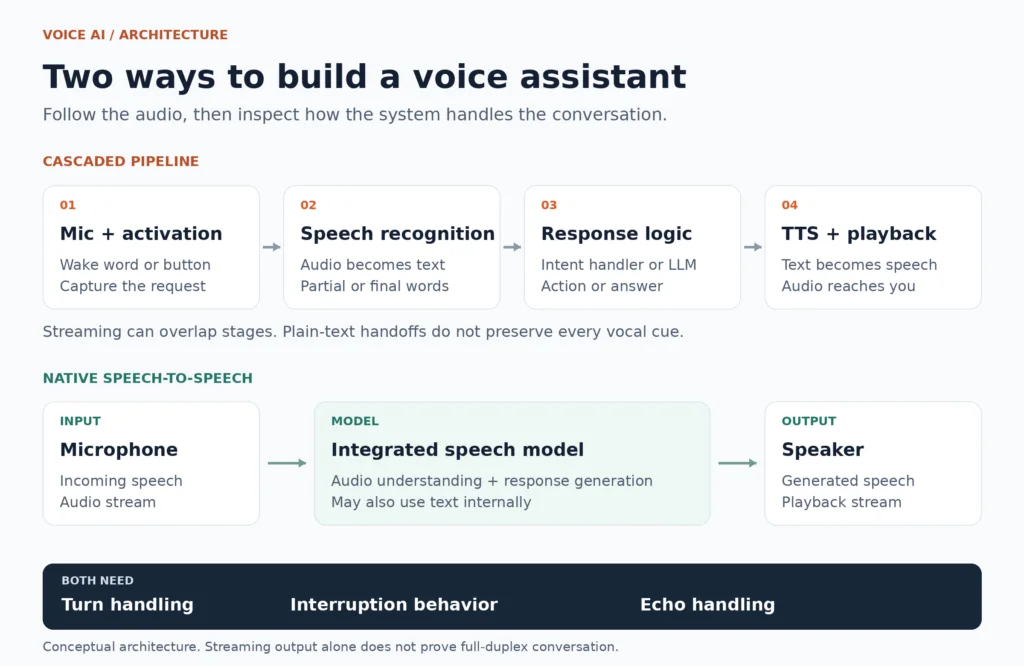
The blocks show responsibilities, not a requirement to finish each stage before starting the next. Streaming allows work to overlap.
How Alexa, Siri and Google Assistant divide device and cloud work
Alexa detects its wake word on the device before streaming the request to Amazon’s cloud. Google Assistant similarly separates local standby detection from activated requests sent to Google servers.
Siri’s processing location depends on the device and settings. Supported configurations process speech audio locally; others send it to Apple. Even local recognition can lead to a request that needs online information.
The split varies by product, software version and request. Local activation describes one stage of the voice AI pipeline, not where every stage runs.
Wake words, voice activity and turn detection are different jobs
A wake-word detector scores whether an activation phrase occurred. openWakeWord is one local option. Test both accidental activations and missed requests, including television audio, distance and room echo.
Voice activity detection, or VAD, identifies likely speech. Silero VAD can run locally. VAD does not identify the speaker or decide whether the sentence is complete.
End-of-turn detection decides whether the person has finished their thought:
“Turn off the lights in… the kitchen.”
The pause is real, but the request is incomplete. Closing the turn too early cuts the user off; waiting too long delays the answer. LiveKit’s turn-handling documentation describes decisions that can use linguistic meaning and acoustic cues alongside speech detection.
Why voice assistants feel slow
The gap from the user’s last spoken sound to the first audible reply is end-of-speech-to-first-audio latency. Measuring it requires following the request all the way to the speaker.
For a cascaded assistant, a useful trace records five events:
- The user stops speaking.
- The system accepts the turn as complete.
- Enough response text exists to begin speech synthesis.
- The first playable audio chunk is ready.
- That audio actually begins playing at the speaker.
In a sequential implementation, these intervals add up. Streaming can overlap work, so measure the complete interaction directly rather than summing isolated component benchmarks. LiveKit’s session traces distinguish overall response timing from individual stages.
An illustrative latency budget
Consider these hypothetical, non-overlapping delays after the user stops speaking. They are teaching values, not product measurements or targets.
| Work remaining | Example delay |
| Accept the end of the turn | 600 ms |
| Finish recognition after that decision | 150 ms |
| Generate enough response text for TTS | 250 ms |
| Produce the first playable speech chunk | 150 ms |
| Deliver and buffer audio for playback | 100 ms |
| Total wait before the reply begins | 1,250 ms |
Halving the recognition stage saves 75 ms. Reducing the turn-ending wait from 600 to 300 ms saves 300 ms, if the shorter wait still handles natural pauses correctly. Neither improvement requires changing every model.
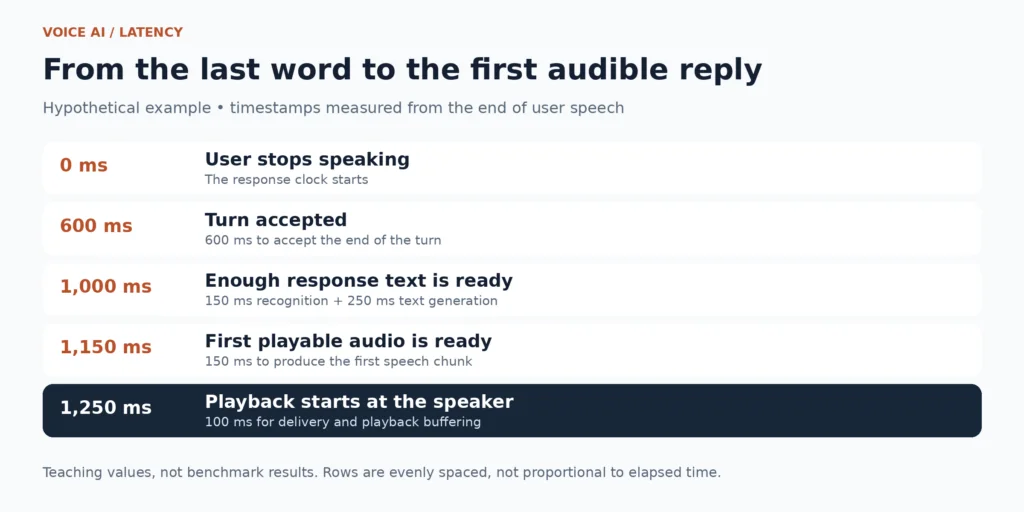
The timeline uses the teaching values above. Recognition finishes between turn acceptance and the point where enough response text is ready.
For context, a human turn-taking study across ten languages found the most common transition offsets between 0 and 200 ms. That helps explain sensitivity to pauses, but is not a performance threshold for an assistant completing complex tasks.
Published latency reference points
The following figures provide scale, but measure different things. They should not be added together or treated as a product ranking.
| Source | Published figure | What it means |
| LiveKit turn tuning | Default minimum endpointing delay: 0.5 seconds | A configurable turn-handling setting. Its interaction with VAD or provider endpointing depends on the selected mode. |
| Twilio core latency guide | STT: 350 ms; LLM first token: 375 ms; TTS first byte: 100 ms; mouth to ear: 1,115 ms | Engineering targets for a straightforward cascade, not measured results for a specific assistant. The total also includes transport and buffering. |
| Home Assistant local voice guidance | Whisper: about 8 seconds on a Raspberry Pi 4, under 1 second on an Intel NUC | Approximate speech-processing guidance. The page does not provide a complete model and test configuration for reproducing the comparison. |
“Faster than real time” does not mean an instant reply
Real-time factor, or RTF, compares processing time with audio duration:
RTF = processing time ÷ audio duration
Processing ten seconds of recorded speech in two seconds gives an RTF of 0.2. If processing begins after recording ends, the user still waits two seconds for the transcript. For TTS, the denominator is generated audio duration; RTF alone cannot tell you when playback begins.
Our published RK1 speech tests, dated June 1, 2026, provide a concrete batch reference. Whisper.cpp processed the same five-minute, 16 kHz mono English recording on a 32 GB RK1 with eight threads:
| Whisper model | Processing time | RTF |
| Base | 48.57 seconds | 0.16 |
| Small | 141.86 seconds | 0.47 |
| Medium | 453.96 seconds | 1.51 |
These are batch results from RK1, not conversational response delays or Jetson predictions. Small finished within the recording’s duration; Medium took longer.
For Piper, the short sample of approximately ten words took 0.58 seconds with en_US-amy-medium, producing 4.90 seconds of audio at 0.119 RTF. With en_US-ryan-high, the same text took 2.46 seconds, producing 3.66 seconds of audio at 0.671 RTF. Across all three text lengths, Amy ranged from 0.103 to 0.119 RTF and Ryan from 0.631 to 0.671. These figures measure total synthesis, not first-audio latency.
Streaming speech recognition and TTS: where the time goes
Streaming lets a system work while audio or text is still arriving. The important question is how much input it must accumulate before producing useful output.
Speech recognition: partial text versus stable text
A streaming recognizer can produce provisional words before an utterance ends. Later context may change them, so the application needs a policy for when text is stable enough to use.
The original Whisper implementation transcribes files through sliding 30-second windows. Interactive integrations add their own buffering and transcript-update policies; they need not wait 30 seconds per response. faster-whisper links to streaming systems built around its inference engine.
NVIDIA’s 600-million-parameter Parakeet-TDT-0.6B-v3 includes an example with 2-second chunks, 10 seconds of left context and 2 seconds of right context. These settings matter to responsiveness alongside inference speed.
Evaluate partial-text timing, final transcript delay and recognition accuracy together. Device names, numbers and corrections deserve special attention: mishearing “fifteen minutes” changes the action even if every other word is correct.
Language generation: the first token is only the beginning
An LLM’s time to first token includes work before generation begins. Prompt processing, long conversation histories, model loading and queues can all delay that first output. Our prefill and decode guide explains the distinction.
TTS may need more than one token to start. Waiting for a sentence adds text-accumulation time; waiting for the entire answer adds more.
LiveKit’s preemptive generation can prepare a response before the turn is confirmed. Continuing speech may force that work to be discarded. Keep speculative text generation separate from committing external actions.
Speech synthesis: start promptly, then keep playing
For TTS, two properties matter: how soon audio begins and whether the system can keep producing it without gaps. Small chunks reduce startup buffering, but offer less text context for phrasing and pronunciation. Larger chunks provide more context at the cost of waiting longer.
Piper provides a local neural text-to-speech engine. Whichever engine you choose, inspect the wrapper around it: a fast synthesizer cannot help first-audio latency if the application waits for a complete WAV file before playing anything.
Interruptions: stop playback and keep listening
If a user says “Actually, just the first meeting” during a spoken schedule, stop the old playback, cancel obsolete generation and retain the correction. Stopping the model alone may leave queued audio playing.
The microphone also hears the assistant’s speaker. Acoustic echo cancellation, or AEC, uses a playback reference to help remove that sound from microphone input. WebRTC recommends placing audio processing close to the hardware. Noise suppression handles problems such as fan noise; it does not replace echo cancellation.
Interruption handling also needs to distinguish a correction from a quiet acknowledgment. “Wait, that’s wrong” and “mm-hmm” need not stop the assistant in the same way.
Cascaded voice AI versus native speech-to-speech models
A cascade uses text to connect recognition, response generation and speech synthesis. A native speech-to-speech model integrates audio understanding and generation more closely, allowing audio representations to carry vocal information a transcript omits.
Native speech can still use text internally. Moshi’s 2024 paper describes joint text/audio generation and separate incoming and outgoing speech streams. The September 2025 Qwen3-Omni report describes cooperating Thinker and Talker components.
For builders, the main choice is control over components. A cascade lets you replace recognition, the agent or the voice independently and inspect their handoffs. An integrated model ties more of those choices to one architecture. Neither design guarantees lower latency or better interruptions.
The speech-to-speech landscape in October 2026
In October 2026, the speech-to-speech landscape includes both hosted services and models with downloadable weights:
| Model or family | Reference | What matters for builders |
| OpenAI GPT-Realtime-2 | API model documentation | Hosted speech-to-speech model with tool use and configurable reasoning effort. More reasoning can increase response delay. |
| OpenAI GPT-Live-1.1 and GPT-Live-1.1 Quip | System card, October 15, 2026 | Full-duplex voice models designed to keep listening through pauses and interruptions. Available through OpenAI’s hosted products, including ChatGPT. |
| Google Gemini 3.8 Live and Live Extended Thinking | Announcement, September 15, 2026 | Hosted live interaction, including visual context and background tool work while conversation continues. |
| NVIDIA PersonaPlex 7B v1 | Model release, January 15, 2026 | Open-weight, full-duplex English speech model with text-based role and audio-based voice conditioning. Weights use the NVIDIA Open Model License. |
| NVIDIA Nemotron Labs VoiceChat 11B | Model release, August 3, 2026 | Open-weight, full-duplex model combining speech recognition, language processing and speech generation, with a separate tool channel. Uses OpenMDW v1.1. |
Compare these systems using the same audible-response boundary. Model-internal latency, first output and end-of-turn delay describe different intervals, so their headline figures cannot form a fair speed ranking.
Do PersonaPlex 7B and VoiceChat 11B fit an 8 GB Jetson?
At 16-bit precision, their weights alone exceed 8 GB. Quantized deployment needs a separate runtime and memory check.
PersonaPlex’s architecture section lists 7B parameters, while its Hugging Face Safetensors summary lists 8B. That rounded 8B count implies approximately 16 GB of weights at two bytes per parameter. VoiceChat’s advertised 11B implies approximately 22 GB. Both estimates use decimal GB and exclude caches, working buffers and the operating system.
PersonaPlex file access requires accepting the repository conditions. NVIDIA lists A100 80 GB inference test hardware, not a minimum requirement. Neither model card establishes an 8 GB Jetson deployment. For that device, a cascade with individually sized components is a more concrete starting point.
Streaming, barge-in and full duplex are not synonyms
Streaming processes or emits information incrementally. Barge-in lets a user interrupt playback. Full duplex supports listening and speaking simultaneously.
A streaming cascade can support barge-in, while an integrated model can still be exposed through a turn-based interface. Judge the actual interaction. Full-Duplex-Bench-v2, published at ACL 2026, evaluates corrections and entity tracking alongside turn-taking.
What can run in a local voice assistant?
Home Assistant documents local voice using Speech-to-Phrase or Whisper with Piper. Start with push-to-talk so activation errors do not obscure problems further down the pipeline. Then choose components for the task:
| Goal | Concrete starting stack | First decision to test |
|---|---|---|
| Home-control commands | Home Assistant Assist, Speech-to-Phrase, the built-in conversation agent and Piper | Whether the supported commands cover your device names and daily requests |
| Broader speech recognition | Whisper.cpp with Whisper Base or Small, an intent handler, and Piper | Whether the smaller model recognizes your actual speech accurately enough |
| Open-ended conversation | The same ASR and TTS services, plus a local text LLM such as Qwen3 1.7B | The complete memory budget and delay with all services loaded |
Our October 13, 2026 Jetson results give Qwen3 1.7B Q4_K_M a 1.11 GB GGUF file, 39.42 tokens/s decode and approximately 1,408 tokens/s prompt processing. These are five-run llama-bench results from separate tg128 and pp512 tests, using the Orin Nano 8 GB on Turing Pi 2.5, llama.cpp’s CUDA backend and the 25 W profile.
Those rates measure text throughput, not time to first token or spoken-response latency. The file size excludes caches and runtime memory; add ASR and TTS before assessing the complete memory budget.
Whisper Base has 74 million parameters, Small 244 million and Medium 769 million. For broader English-only recognition, begin with base.en and Piper’s en_US-amy-medium voice. Try a larger recognizer when errors justify the cost, or a different voice when listening quality justifies slower synthesis. Use the multilingual recognizer and a matching TTS voice for other languages.
Check exact language coverage: Parakeet v3 lists 25 European languages, excluding Hindi and Gujarati. Recognition and speech synthesis need separate language checks.
Check code and model licenses separately. As of October 19, 2026, openWakeWord uses Apache-2.0 for code, but its included pretrained models use CC BY-NC-SA 4.0, which restricts commercial use. Its latest tagged release is from February 11, 2024.
Piper uses GPL-3.0, its README seeks maintainers, and individual voice licenses need separate review. Release dates and maintenance notices help plan support; they do not measure speech quality.
Where Turing Pi 2.5 fits
Turing Pi 2.5 provides four compute-module slots and an Ethernet switch. One deployment to evaluate puts compatible GPU inference on a Jetson, home-automation orchestration on an RK1, and microphones and speakers in room devices. NVMe on a supported node can hold models and persistent data.
Separate nodes provide separate resource budgets. They also add service and network boundaries, and their memory is not pooled. Move services when measurements reveal contention or capacity limits; this layout is a deployment option, not a measured voice benchmark.
Local processing and audio retention
Trace where audio, transcripts and prompts go, including cloud fallback and external tools. For a privacy-focused build, keep audio buffers transient and store operational timings separately. Enable recordings deliberately for diagnosis. A locally recognized weather request may still send a location to an online service.
Find the delay before changing the model
The same audible symptom can have several causes. Use this diagnostic guide to choose the next measurement, not to assume a cause:
| What you notice | What to measure | What to try if confirmed |
| Long silence before the system accepts the turn | Speech end to turn acceptance | Adjust endpointing; recheck natural pauses and unfinished sentences |
| Turn accepted, but the transcript arrives late | Final transcript timing and pending audio | Review ASR buffering, chunk settings and model size |
| Transcript ready, but no response text | First-token timing, prompt length and tool waits | Shorten unnecessary context; distinguish model delay from a slow tool |
| Text appears quickly, but speech starts late | Text accumulation, TTS first chunk and playback start | Stream suitable text chunks and playable audio instead of waiting for complete output |
| Old speech continues after an interruption | Interruption detection, cancellation and playback stop | Cancel obsolete work and clear queued playback |
| The assistant responds to its own voice | Microphone input during speaker playback | Check the echo-cancellation reference and audio path |
Change one setting at a time. A lower endpointing delay only helps if the assistant still waits through “the lights in… the kitchen.” A smaller recognizer only helps if it still gets the device name right.
For repeatable comparisons, keep requests, microphone position and room conditions consistent. Record the model, runtime, language, chunk settings, power mode and concurrent workloads. Separate cold starts from requests with models already loaded.
Report the median (p50) and 95th-percentile (p95) end-of-speech-to-audible-response delay, plus sample count. Also record time to completed action, interruption-to-playback-stop delay and command success. Word error rate counts substitutions, deletions and insertions relative to reference words; a correct transcript and a successful action are separate outcomes.
Include a direct command, a natural pause, a correction, background speech and a request made during playback. Finally, distinguish a quick “Let me check” from the useful answer. The goal is a conversation that completes the right task promptly and yields when the user speaks.
Related articles
- Whisper.cpp and Piper TTS on Turing Pi 2.5: Offline Speech Recognition and Voice Synthesis on ARM64
- Why Local LLMs Are Fast or Slow: Tokens per Second, Memory Bandwidth, Prefill and Decode
FAQ
Do voice assistants need an LLM?
No. A command assistant can recognize a supported sentence and map it directly to an action. An LLM adds flexibility for open-ended requests, but is only one option for the conversation agent.
Can a voice assistant work without the internet?
Yes, when recognition, response generation, speech synthesis and the requested action all run locally. Models and software need to be available first. Requests that depend on online services still need connectivity.
Why is my voice assistant slow even with a GPU?
A GPU accelerates supported model computation. The assistant may still be waiting for a turn-ending timeout, transcript finalization, enough text for TTS, a tool result or audio playback buffers. Measure the full response path to find the limiting stage.
Is speech-to-speech always faster than speech-to-text plus TTS?
No. Integrated models can reduce some handoffs and stream audio effectively, but actual response time depends on hardware, runtime, buffering and turn handling. Compare the same end-of-speech-to-audible-response boundary.
Is an always-listening assistant always recording me?
Listening for a wake word requires processing microphone audio, usually through temporary buffers. Saving recordings and sending audio to a server are separate behaviors. Check each stage’s configuration and retention settings rather than inferring them from the wake-word feature.