
If you are new to NVIDIA Jetson, its software stack can look more complicated than the hardware. JetPack, Jetson Linux, CUDA, cuDNN, TensorRT, containers, frameworks, inference servers, and application code often appear in the same setup guide, even though they solve different problems. The confusion usually comes from seeing all of those names at once without a clear picture of where each one belongs.
That distinction matters when a Jetson becomes one node inside a Turing Pi 2.5 system. You may want the Jetson to serve an LLM, process camera feeds, transcribe audio, generate embeddings, or expose an internal inference API while other nodes handle storage, databases, monitoring, automation, and ordinary services. When every layer has a defined role, the system becomes much easier to design, troubleshoot, reproduce, and maintain.
In the first article in this series, we installed an 8GB Jetson Orin Nano on Turing Pi 2.5, flashed Jetson Linux while the module remained in the board, installed JetPack, and verified CUDA. We then examined which Jetson modules fit Turing Pi 2.5 and what kinds of systems they enable, followed by a broader look at when local and edge AI make sense.
This article moves one layer deeper by mapping the software path from Jetson hardware to the application that uses it. It explains what each major component does, where containers and frameworks fit, and which parts of the stack matter most for LLMs, computer vision, speech, and other accelerated workloads.
1. The Jetson software stack at a glance
The easiest way to understand the stack is to read it from the bottom upward. Jetson hardware provides the CPU, GPU, unified memory, accelerators, and I/O. Jetson Linux makes that hardware usable as a supported Linux platform, CUDA exposes general GPU computing, and higher-level libraries and runtimes turn that compute capability into something an application can use.
The NVIDIA Jetson software stack from hardware and Jetson Linux through CUDA, accelerated libraries, runtimes, and applications
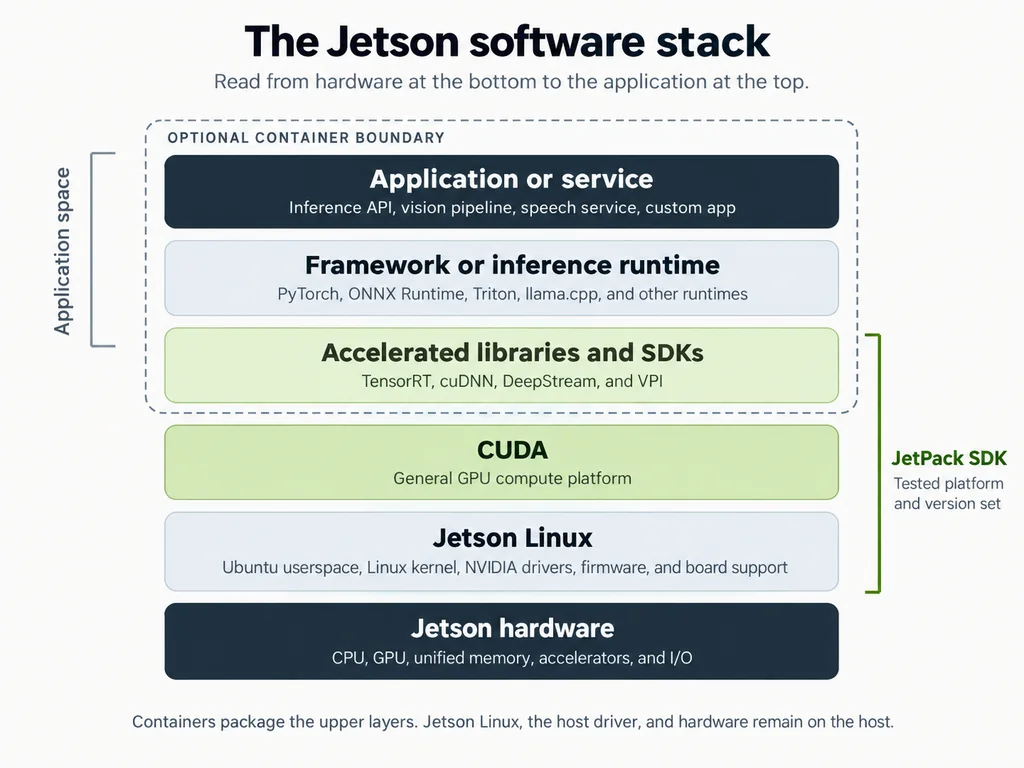
The major layers in a Jetson application. An optional container can package application-side software, but it still relies on the host Jetson platform
The application usually sits at the top of this path. It may call PyTorch, ONNX Runtime, TensorRT, Triton Inference Server, llama.cpp, or another runtime rather than interacting directly with the GPU. Those tools then use the NVIDIA software beneath them according to the workload and configuration.
JetPack sits across much of the platform rather than acting as one more runtime in the stack. It is NVIDIA’s tested software bundle for Jetson, bringing together Jetson Linux, CUDA, accelerated libraries, development tools, APIs, and related platform components.
Containers are different again. They package an application and its compatible userspace dependencies, but they do not replace the host driver, Jetson Linux, or the hardware. Keeping those three ideas separate removes most of the apparent complexity.
2. JetPack and Jetson Linux form the supported platform
JetPack and Jetson Linux are closely related, but they are not interchangeable names. Jetson Linux is the operating-system and board-support foundation. JetPack is the broader software release that pairs that foundation with a tested set of NVIDIA compute libraries, tools, and SDKs.
JetPack is the software bundle
NVIDIA describes JetPack SDK as the software suite for building AI applications on Jetson. A JetPack release combines a specific Jetson Linux release with supported versions of CUDA, cuDNN, TensorRT, developer tools, multimedia components, and other platform software.
At the time of writing, NVIDIA lists the following software in JetPack 7.2.1:
| Component | JetPack 7.2.1 |
| Jetson Linux | 39.2.1 |
| Linux kernel | 6.8 |
| Base distribution | Ubuntu 24.04 |
| CUDA | 13.2.1 |
| cuDNN | 9.20.0 |
| TensorRT | 10.16.2 |
| VPI | 4.1.3 |
| DeepStream | 9.1 |
| NVIDIA Container Toolkit | 1.19 with the ISO image |
Source: NVIDIA JetPack SDK Downloads and Notes.
Those version relationships are part of the value of JetPack. It should be treated as a tested platform, not merely a convenient meta-package. Installing unrelated versions of CUDA, TensorRT, cuDNN, the NVIDIA drivers, and Jetson Linux independently can create compatibility problems that are difficult to diagnose.
For most deployments, the sensible starting point is to choose a JetPack release that supports the hardware and workload, keep its Jetson Linux base aligned, and build the application on top of that known platform. In a multi-node Turing Pi system, recording that baseline also makes it easier to rebuild the Jetson or reproduce the same container environment later.
Jetson Linux is the hardware-facing foundation
NVIDIA’s Jetson Linux driver package is the board support package for Jetson. It includes the Linux kernel, UEFI bootloader, NVIDIA drivers, flashing utilities, an Ubuntu-based sample root filesystem, and the low-level platform support required by the hardware.
That responsibility extends beyond simply booting Ubuntu. Jetson Linux covers firmware, device configuration, power management, storage and I/O support, camera and multimedia interfaces, recovery, flashing, and the driver layer that exposes the GPU and other Jetson hardware correctly.
This boundary is useful when troubleshooting. A boot failure, missing device, kernel problem, flashing issue, or unavailable NVIDIA driver belongs near the platform layer. Installing a different AI framework cannot compensate for an incorrectly configured Jetson Linux base, just as changing CUDA will not fix a board that cannot boot or detect its hardware.
The Orin Nano system used throughout this series runs Jetson Linux R39.2.1 with an Ubuntu 24.04 userspace as part of JetPack 7.2.1.
3. CUDA, cuDNN, and TensorRT solve different problems
CUDA, cuDNN, and TensorRT are often discussed as if a developer must choose between them. In practice, they occupy different layers and may all participate in the same application.
| Component | Primary role | Typical interaction |
| CUDA | General GPU-computing platform | Used directly by CUDA code or indirectly through frameworks and runtimes |
| cuDNN | Optimized deep-learning primitives | Usually selected underneath a framework |
| TensorRT | Inference optimization SDK and runtime | Used to import, optimize, build, and deploy supported trained models |
CUDA provides general GPU computing
CUDA is NVIDIA’s parallel-computing platform and programming model. It lets suitable work execute on an NVIDIA GPU instead of leaving every operation on the CPU.
A developer can write CUDA code directly, but most Jetson users interact with it through higher-level software. PyTorch, TensorFlow, TensorRT, computer-vision libraries, model-serving tools, and specialized inference runtimes can all use CUDA beneath their own APIs. That is why CUDA matters even when an application contains no custom CUDA kernels.
CUDA is also broader than AI. Scientific computing, image processing, numerical workloads, and other parallel tasks can use it without involving a neural network. On Turing Pi 2.5, it is the fundamental layer that lets the Jetson take on GPU-accelerated work that conventional CPU nodes cannot execute in the same way.
cuDNN supplies optimized neural-network operations
cuDNN is NVIDIA’s CUDA Deep Neural Network library. It provides optimized implementations of operations that recur across neural networks, including convolution, matrix multiplication, attention, normalization, softmax, pooling, and element-wise operations.
These are building blocks rather than a complete model server or application. A framework can select cuDNN operations underneath its own high-level API, which lets developers benefit from NVIDIA’s optimized kernels without invoking cuDNN manually.
For that reason, saying that a workload uses CUDA does not describe the entire execution path. A PyTorch application may call framework operations that use cuDNN, which in turn executes GPU work through the CUDA platform. Other runtimes may rely more heavily on their own CUDA kernels, so cuDNN is common but not universal.
TensorRT optimizes trained models for inference
TensorRT is NVIDIA’s high-performance deep-learning inference SDK. Its focus is not training a model but preparing and executing a supported trained model efficiently on NVIDIA hardware.
During the build phase, TensorRT can optimize the graph, fuse layers, select and tune kernels, choose supported reduced-precision paths, and plan memory and execution. It then produces an engine that the TensorRT runtime loads during deployment.
TensorRT workflow from a trained model through import, optimization, engine building, runtime loading, and Jetson GPU execution.
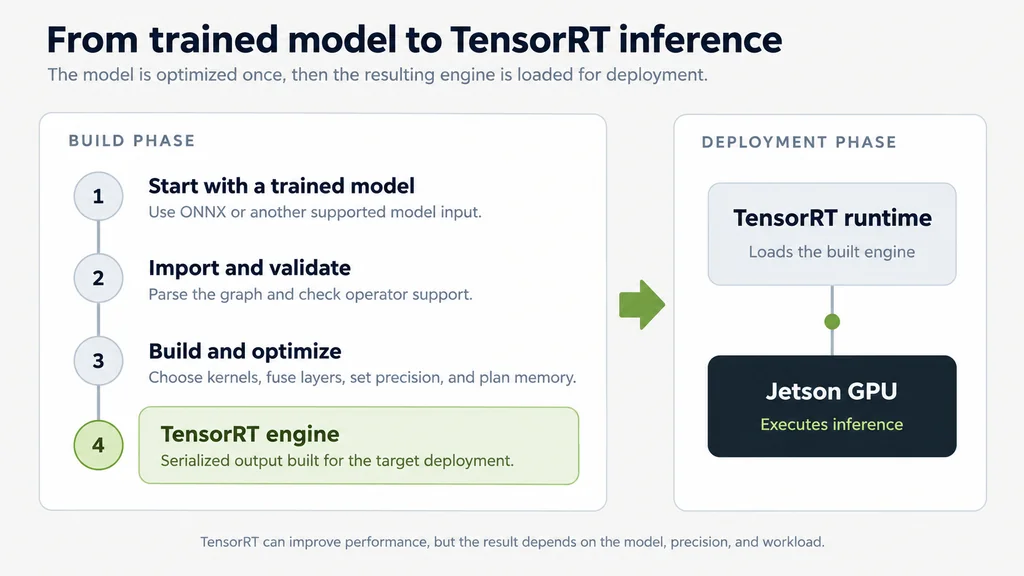
TensorRT separates model conversion and engine building from the runtime that performs inference.
That process can improve latency, throughput, or memory behavior, depending on the model and workload. It also introduces work around model conversion, supported operators, precision choices, engine creation, and hardware-specific deployment.
TensorRT is therefore an optimization path, not a universal switch that automatically improves every application. Later articles in this series will test when that extra work produces a meaningful real-world improvement.
4. Frameworks and inference runtimes sit above the NVIDIA platform
Most applications do not call CUDA, cuDNN, or TensorRT directly. They use a framework, model-specific runtime, or inference server that decides how to reach the GPU.
| Application path | What typically happens beneath it |
| PyTorch or TensorFlow application | The framework dispatches supported operations through CUDA and, where applicable, cuDNN or other optimized libraries |
| ONNX Runtime application | A configured execution provider may use CUDA, TensorRT, or another supported backend |
| TensorRT service | The application loads a built TensorRT engine and executes it through the TensorRT runtime |
| llama.cpp or another model-specific runtime | The runtime uses its own supported CPU or CUDA kernels and memory strategy |
| Triton Inference Server | Triton accepts network requests and routes them to the configured framework or TensorRT backend |
This is why two applications running the same model on the same Jetson can behave differently. The runtime, backend, precision, model format, preprocessing pipeline, kernel implementation, memory behavior, and serving architecture all affect the result.
It also explains why a successful CUDA installation does not guarantee that every application will use the Jetson GPU correctly. The selected framework still needs a compatible ARM64 build, support for the installed JetPack platform, the right backend configuration, and kernels that work well for the model.
Any useful Jetson benchmark must therefore identify more than the hardware. It should also record the JetPack release, framework or runtime, backend, model build, precision, and relevant configuration instead of treating “Jetson performance” as one universal number.
5. Containers package the application without replacing the host stack
A container provides an isolated userspace in which an application and its dependencies can be packaged together. On Jetson, the NVIDIA Container Toolkit connects a compatible container to the GPU capabilities provided by the host platform.
The boundary is important. A container can include the application, Python environment, framework, inference runtime, model server, and compatible userspace libraries. It still depends on the host for Jetson Linux, the NVIDIA driver interface, and the physical GPU.
| Host remains responsible for | Container can package |
| Jetson Linux, kernel, NVIDIA driver, device access, hardware support | Application code, runtime, framework, Python packages, service configuration, compatible userspace libraries |
A container cannot make an incompatible application stack compatible by itself. The image must still support ARM64 and match the relevant JetPack, driver, and library constraints. If GPU access fails, the host configuration and Container Toolkit remain part of the troubleshooting path.
Development and production containers serve different goals
NVIDIA publishes container images that can provide full framework, development, or inference environments. These may include compilers, Python, debugging tools, notebooks, samples, framework packages, and development libraries.
A production service usually benefits from a narrower image containing only the application, its selected runtime, the API server, required libraries, and access to persistent model storage. Keeping this distinction clear avoids turning the Jetson host into a collection of manually installed and potentially conflicting packages.
For a long-running Turing Pi system, containers also make deployments more repeatable. They improve dependency isolation, make upgrades and rollbacks more deliberate, separate services cleanly, and reduce unnecessary changes to the host operating system.
6. Different AI workloads expose different parts of the stack
Every accelerated workload uses the same platform foundation, but the layers visible to the application vary. An LLM runtime may emphasize custom CUDA kernels, a vision pipeline may make heavy use of TensorRT and DeepStream, and a speech service may depend mainly on the framework chosen by the model.
LLM inference
A local language-model service usually begins with an application or API that calls an LLM runtime. That runtime may execute its own CUDA kernels, use NVIDIA-specific model tooling, or follow a TensorRT-based path.
For the user, CUDA support is necessary but not sufficient. The runtime also needs an ARM64-compatible build, working GPU acceleration on the installed JetPack release, suitable kernels, and memory behavior that fits the model and context length. cuDNN may exist in the wider environment without being the most visible part of the path.
Computer vision
A vision system often touches more of the Jetson-specific ecosystem because inference is only one stage of the pipeline. Video capture or network ingestion, hardware decode, preprocessing, TensorRT inference, event handling, storage, and notifications may all need to work together.
DeepStream can provide a higher-level video analytics framework around several of those stages, while VPI supplies accelerated computer-vision and image-processing primitives. A smaller application may instead combine its own decode and preprocessing path with TensorRT or a framework runtime.
Speech workloads
Speech systems vary depending on whether they perform transcription, synthesis, classification, or a larger voice workflow. A transcription service typically accepts audio, preprocesses it, runs a speech model through a supported runtime, and returns text. The use of cuDNN, TensorRT, or custom CUDA kernels depends on that runtime rather than on speech as a category.
The output may then be sent to an LLM, search service, or application running elsewhere in the cluster. A single user-facing feature does not require every stage to live on the GPU node.
| Workload | Most visible application-side layer | Main compatibility question |
| LLM | Model-specific runtime or NVIDIA LLM tooling | Does the runtime provide a good ARM64 and CUDA path for this model? |
| Vision | TensorRT, DeepStream, VPI, or a framework | Can capture, decode, preprocessing, and inference operate as one reliable pipeline? |
| Speech | Framework or speech-specific runtime | Which accelerated backend does the selected model and runtime actually use? |
7. The Jetson should remain a specialized node in the Turing Pi system
The NVIDIA stack gives a Jetson valuable acceleration capabilities, but it does not make the Jetson the best home for every service. Databases, storage, monitoring, automation, dashboards, and ordinary backends can remain on RK1 or other compute nodes while the Jetson exposes accelerated workloads through stable network APIs.
Turing Pi 2.5 architecture with RK1 service and data nodes connected to a specialized Jetson inference node through the cluster network.
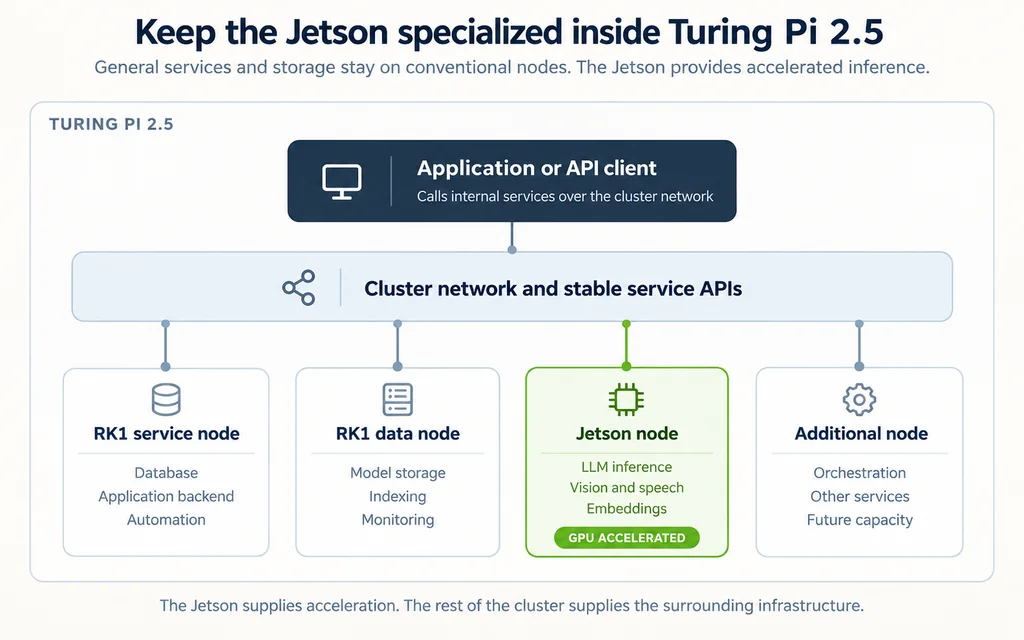
A mixed cluster can keep accelerated inference separate from the services and data around it.
This separation makes the physical location of inference less important to the application. If the Jetson exposes a stable API, a backend can call it in the same way it would call any other internal service.
The design also keeps failure domains and upgrades easier to reason about. Restarting or rebuilding the inference service does not need to disturb the database. Moving model storage does not require changing the CUDA installation. Adding another application does not automatically increase the software burden on the specialized GPU node.
The Jetson provides accelerated compute. The surrounding Turing Pi system provides the infrastructure that makes that compute useful.
8. Design and troubleshoot the stack from the bottom upward
When a Jetson workload does not work as expected, start at the lowest relevant layer and move upward. This avoids changing frameworks or containers while the actual problem sits in the host platform.
| Step | Question | What to inspect |
| 1 | Can the platform boot and see the hardware? | Jetson Linux, firmware, kernel, device configuration, storage, NVIDIA drivers |
| 2 | Can software access the GPU? | CUDA installation, device visibility, host libraries, driver state |
| 3 | Does the framework support this platform? | ARM64 package, framework version, JetPack compatibility, backend configuration |
| 4 | Does the workload need deeper optimization? | TensorRT support, engine conversion, precision, specialized kernels, latency and throughput targets |
| 5 | How should the service be deployed? | Container or native packages, model storage, API, networking, logging, upgrades, rollback plan |
The order matters. If the platform cannot expose the GPU correctly, rebuilding a model engine will not help. If the framework does not support the installed ARM64 and JetPack combination, reorganizing the container will not create that support.
Once the lower layers are known to work, optimization becomes a separate and measurable question. You can then compare runtimes, precision choices, or TensorRT engines without confusing performance tuning with basic platform setup.
9. Version alignment matters, but JetPack does not design the application
Jetson’s software layers are integrated closely enough that upgrades should be treated as platform changes rather than random package updates. A new JetPack release may change Jetson Linux, the kernel, CUDA, cuDNN, TensorRT, development tools, and container expectations together.
For a reproducible deployment, record at least the JetPack and Jetson Linux releases, container image, application version, model version, runtime and backend, engine build details where applicable, and the configuration used to expose the service. The same record should accompany benchmarks because a throughput number without its software context is incomplete.
Version alignment still does not answer the application’s architectural questions. JetPack does not choose the model, select the best runtime, organize persistent model storage, define the service API, add authentication, collect logs and metrics, plan for an unavailable inference node, or decide where application state belongs.
Those are infrastructure and product decisions. A standalone developer kit often encourages every dependency to accumulate on one device, but a multi-node platform allows inference, storage, APIs, databases, and monitoring to be separated deliberately. The NVIDIA stack supplies the accelerated platform; the surrounding system determines how that platform is operated.
Conclusion
The NVIDIA Jetson software stack becomes much easier to understand once every component has a defined role. Jetson Linux supplies the operating-system and board-support foundation, while JetPack packages that foundation with a tested set of NVIDIA compute libraries, tools, and SDKs.
CUDA provides general GPU computing. cuDNN provides optimized neural-network primitives that frameworks can use. TensorRT offers an inference-focused path for importing, optimizing, building, and running supported trained models. Frameworks and model runtimes sit above those components and determine the path an actual workload follows.
Containers package application-side software and connect it to the host’s GPU capabilities through the NVIDIA Container Toolkit. They improve isolation and repeatability, but they do not replace Jetson Linux, the NVIDIA driver, or the hardware beneath them.
Inside Turing Pi 2.5, those boundaries also clarify the role of the Jetson. It can remain a specialized accelerated-compute service while storage, databases, automation, monitoring, and general applications run elsewhere in the cluster.
The next article will turn that architecture into a maintainable deployment by giving the Jetson a deliberate NVMe layout, persistent model storage, containers, networking, logging, and an update strategy for long-running AI workloads.
FAQ
Is JetPack the same as Jetson Linux?
No. Jetson Linux is the board-support and operating-system foundation for Jetson hardware. JetPack is the broader NVIDIA software bundle that pairs a specific Jetson Linux release with CUDA, cuDNN, TensorRT, developer tools, APIs, and other platform components.
Do I need TensorRT to use CUDA on Jetson?
No. Applications can use CUDA directly or through frameworks and runtimes without using TensorRT. TensorRT is an optional, inference-focused optimization and deployment path for supported trained models. Whether it is worthwhile depends on the model, runtime, performance target, and work required to build and maintain the engine.
Does every Jetson AI workload need cuDNN?
No. cuDNN is commonly used underneath deep-learning frameworks, but it is not required by every GPU workload. Some applications use CUDA directly, some use TensorRT, and some model-specific runtimes provide their own CUDA kernels.
Does a container replace JetPack or Jetson Linux on the host?
No. A container can package an application, framework, runtime, and compatible userspace libraries, but GPU-enabled containers still depend on Jetson Linux and the host NVIDIA driver stack.
Can Docker containers use the GPU on NVIDIA Jetson?
Yes. With a correctly configured host and the NVIDIA Container Toolkit, a compatible container can access the Jetson GPU. The image must still support ARM64 and remain compatible with the relevant JetPack, Jetson Linux, driver, and library versions.
Which JetPack version does this Turing Pi 2.5 setup use?
The Orin Nano system used throughout this series runs JetPack 7.2.1 on Jetson Linux R39.2.1. NVIDIA pairs that release with CUDA 13.2.1, cuDNN 9.20.0, TensorRT 10.16.2, VPI 4.1.3, DeepStream 9.1, and an Ubuntu 24.04 userspace.