
Cloud speech APIs have a cost. They also have a latency floor you cannot control, a privacy implication you cannot eliminate, and a dependency you cannot remove. Every audio file you send to a third-party service leaves your infrastructure permanently.
Running voice processing locally solves all of that. You own the recordings, the transcripts, the synthesized audio, and the compute. Nothing leaves the machine.
This article covers two tools that make local voice AI practical on ARM64:
Whisper.cpp: A C++ port of OpenAI’s Whisper speech recognition model, optimized for CPU inference on low-power hardware.
Piper: A fast, offline text-to-speech system built specifically for edge devices and single-board computers.
Both run on the Turing Pi 2.5’s RK1 node without a GPU. Neither requires an internet connection after the initial setup.
If you followed Article 3 and set up Ollama for local text generation, this is the natural voice layer to build on top of it. The same design philosophy applies: own your compute, own your data, keep it offline.
Local vs Cloud: Quick Comparison
| Factor | Local (This Setup) | Cloud API |
| Privacy | Recordings stay on device | Audio sent to third-party servers |
| Latency | Fixed by hardware | Variable, network-dependent |
| Cost | One-time hardware | Per-request billing |
| Offline | Fully offline | Requires internet |
| Accuracy | Model-dependent | Generally high |
| Setup effort | Medium | Low |
The tradeoff is real. Cloud APIs are easier to start with and often more accurate on difficult audio. Local inference trades some accuracy headroom for complete control and zero ongoing cost.
What you’ll set up in this article:
By the end, you’ll have Whisper.cpp and Piper TTS installed on your RK1 node, benchmark data showing exactly how each Whisper model performs on the RK3588’s big.LITTLE CPU, and a working shell script that chains all three tools into a complete offline voice pipeline: speech in, spoken response out, no cloud involved.
What you need before starting:
- A Turing Pi 2.5 with at least one RK1 node running Ubuntu 22.04
- NVMe storage attached to the node (models and binaries go here, not eMMC)
- Ollama set up with at least one model loaded (Article 3 covers this)
- Basic familiarity with SSH and the command line
Hardware used in this article: RK1 32GB node on Turing Pi 2.5, Ubuntu 22.04 ARM64, NVMe SSD for model and binary storage.
Part 1: Whisper.cpp on RK3588
What Whisper.cpp Is
Whisper.cpp is Georgi Gerganov’s C++ reimplementation of OpenAI’s Whisper automatic speech recognition model. The same developer built llama.cpp, which was covered in Article 3. The design goal is identical: efficient CPU inference on commodity hardware, no GPU required.
Whisper.cpp uses NEON SIMD intrinsics on ARM64 and scales across multiple cores. The RK3588 has 4 high-performance Cortex-A76 cores and 4 efficiency Cortex-A55 cores, with 32GB of unified system memory in the RK1 configuration tested here. Models load into system RAM alongside everything else.
Real-world use cases:
- Meeting and interview transcription
- Voice note indexing and search
- Podcast chapter generation
- Subtitle generation for locally stored video
- Accessibility tooling and screen readers
Installing Whisper.cpp
Install build dependencies:
sudo apt update
sudo apt install -y git build-essential cmake
Clone directly to your NVMe mount to avoid moving the directory after the build:
cd /mnt/nvme
git clone https://github.com/ggerganov/whisper.cpp
cd whisper.cpp
Build using CMake:
cmake -B build
cmake --build build --config Release -j$(nproc)
The build takes a few minutes. Confirm it completed successfully:
./build/bin/whisper-cli --help
You should see the whisper-cli usage output. If the binary is missing or the command fails, the build did not complete cleanly. Check that build-essential and cmake are installed and that the build directory has at least 500MB of free space.
Download the models you intend to test:
bash ./models/download-ggml-model.sh tiny
bash ./models/download-ggml-model.sh base
bash ./models/download-ggml-model.sh small
bash ./models/download-ggml-model.sh medium
Models download to ./models/. The Medium model is 1.5GB; check available space before downloading:
df -h /mnt/nvme
Understanding Model Tiers
| Model | File Size | Approx. RAM Usage | Best For |
| Tiny | ~75 MB | ~175 MB | Quick tests, low-accuracy transcription, voice commands |
| Base | ~142 MB | ~280 MB | Reasonable accuracy, fast turnaround |
| Small | ~466 MB | ~750 MB | Good accuracy |
| Medium | ~1.5 GB | ~2 GB | High accuracy |
Large models (v2 at ~2.9GB, v3 at ~3.1GB) are technically runnable with 32GB of system RAM. They are slow on CPU-only RK3588 inference. Unless you are running an overnight batch job and accuracy is critical, they are not practical here.
Benchmark Methodology
All benchmarks use a single consistent audio sample: a 5-minute English speech recording encoded as a 16kHz mono WAV file. Using the same audio across all tests allows model performance and accuracy to be compared directly.
Measurements collected for each model and thread count include:
- Wall-clock transcription time
- Peak RSS memory usage
- Real time factor
- Transcription accuracy compared against a known reference transcript
Tests are run at both -t 4 and -t 8 to evaluate how Whisper.cpp scales across the RK3588’s big.LITTLE CPU architecture.
Benchmark Results
| Model | Wall-Clock Time | Real-Time Factor | Peak RSS |
| Tiny | 29.79s | 0.10 (~10× faster than real-time) | 299 MB |
| Base | 48.57s | 0.16 (~6× faster than real-time) | 410 MB |
| Small | 141.86s | 0.47 (~2× faster than real-time) | 889 MB |
| Medium | 453.96s | 1.51 (Slower than real-time) | 2.14 GB |
All results in this table were measured using -t 8, utilizing all RK3588 CPU cores.
RTF (Real-Time Factor) measures processing speed relative to audio duration. Values below 1.0 indicate faster than real-time transcription.
Thread Tuning on RK3588
The RK3588 combines four Cortex-A76 performance cores with four Cortex-A55 efficiency cores. Whisper.cpp allows thread count to be controlled using the -t flag.
To evaluate scaling, each model was benchmarked at both -t 4 and -t 8. Using all eight cores consistently improved performance, although the gains were modest:
| Model | t=4 | t=8 | Improvement |
| Tiny | 32.56s | 29.79s | 8.5% |
| Base | 63.62s | 48.57s | 23.7% |
| Small | 162.16s | 141.86s | 12.5% |
| Medium | 491.77s | 453.96s | 7.7% |
The results reflect the RK3588’s hybrid CPU design. While the additional Cortex-A55 cores do contribute useful throughput, they are significantly slower than the Cortex-A76 performance cores. As a result, moving from four to eight threads does not produce linear scaling.
For dedicated transcription workloads, -t 8 was the fastest configuration across all tested models. On shared nodes running additional services, reducing the thread count may still be worthwhile to preserve CPU headroom for other workloads.
Accuracy Comparison
Accuracy was evaluated using the same 5-minute reference audio and a known ground-truth transcript.
| Model | Notes |
| Tiny | Generally understandable output with occasional word substitutions and numeric recognition errors. |
| Basa | Significant improvement over Tiny, with noticeably fewer transcription and numeric recognition errors. |
| Small | Improved sentence structure, punctuation, and phrasing compared to Base while remaining faster than real-time. |
| Medium | Closest to the source transcript. Captured punctuation, speaker pauses, laughter, applause, and conversational phrasing more consistently than the smaller models. |
Accuracy observations are based on manual comparison against the reference transcript and are intended as qualitative guidance rather than formal word error rate (WER) measurements.
Large-v3-Turbo (optional): Whisper Large-v3-Turbo was also tested on the RK1. It completed the JFK benchmark in 30.9 seconds using approximately 1.8 GB of RAM. Slower than real-time, but the most accurate model available in Whisper.cpp. Worth considering for overnight batch transcription workloads where quality is the priority over speed.
Whisper Verdict
The right model depends on your workload:
- Tiny: Best suited for voice commands, lightweight automation, and latency-sensitive workloads. It achieved the fastest transcription speed and the lowest memory usage, but produced occasional word and numeric recognition errors.
- Base: A solid general-purpose option. It remains significantly faster than real-time while delivering a noticeable accuracy improvement over Tiny.
- Small: The best balance of speed, memory usage, and transcription quality on the RK3588. It remained faster than real-time during testing while producing more accurate and natural transcripts than Base. For most homelab transcription workloads, this is the recommended starting point.
- Medium: The most accurate model tested, but also the most resource-intensive. Processing a 5-minute audio clip required over 7 minutes and consumed more than 2 GB of RAM. Best suited for batch transcription workloads where accuracy is more important than latency.
For most RK3588 users, Small provides the practical sweet spot. It offers a substantial accuracy improvement over Base while remaining comfortably within the performance and memory limits of the RK1.
Part 2: Piper TTS on RK3588
What Piper Is
Piper is an offline text-to-speech (TTS) system from the Rhasspy project. It converts text into spoken audio locally, without cloud APIs, internet connectivity, or external services.
Unlike many modern TTS systems, Piper is designed for edge devices and single-board computers. Models are compact, startup is fast, and the pre-built Linux binaries require no Python environment or dependency management.
Practical use cases:
- Home automation voice alerts and status announcements
- Reading notifications on headless systems
- Voice responses for local assistants powered by Whisper and LLMs
- Accessibility features for self-hosted applications
- Audio monitoring and system status reporting
Piper uses ONNX Runtime for inference and supports dozens of voices across multiple languages. On ARM64 hardware, it provides a simple way to add offline voice synthesis to homelab and edge deployments.
Installing Piper
Check the Piper releases page for the latest version. Download the pre-built aarch64 binary:
cd /mnt/nvme

# Replace VERSION with the latest release tag, e.g. 2023.11.14-2
PIPER_VERSION="2023.11.14-2"
wget "https://github.com/rhasspy/piper/releases/download/${PIPER_VERSION}/piper_linux_aarch64.tar.gz"
tar -xf piper_linux_aarch64.tar.gz
This extracts a piper/ directory containing the piper executable and bundled runtime libraries.
Verify that the binary starts correctly:
./piper/piper --help
Add Piper to your shell path:
export PATH=$PATH:/mnt/nvme/piper
echo 'export PATH=$PATH:/mnt/nvme/piper' >> ~/.bashrc
Download Voice Models
Voice models are hosted in the rhasspy/piper-voices repository. Each voice requires two files:
- The
.onnxmodel - The matching
.onnx.jsonconfiguration
Both files must be stored in the same directory.
mkdir -p /mnt/nvme/piper-voices
cd /mnt/nvme/piper-voices

# US English: Amy (medium)
wget https://huggingface.co/rhasspy/piper-voices/resolve/v1.0.0/en/en_US/amy/medium/en_US-amy-medium.onnx
wget https://huggingface.co/rhasspy/piper-voices/resolve/v1.0.0/en/en_US/amy/medium/en_US-amy-medium.onnx.json

# US English: Ryan (high)
wget https://huggingface.co/rhasspy/piper-voices/resolve/v1.0.0/en/en_US/ryan/high/en_US-ryan-high.onnx
wget https://huggingface.co/rhasspy/piper-voices/resolve/v1.0.0/en/en_US/ryan/high/en_US-ryan-high.onnx.json
Piper provides dozens of voices across multiple languages and regions. Sample previews and the complete voice catalog are available in the rhasspy/piper-voices repository and the Piper sample browser.
Voice quality tiers generally trade model size for synthesis quality:
low: smallest models, fastest inferencemedium: good balance of quality and resource usagehigh: larger models with more natural speech output
Voice Models
| Voice | Quality Tier | Model Size | Notes |
| en_US-amy-medium | Medium | 61 MB | Clear, natural-sounding, good default |
| en_US-ryan-high | High | 116 MB | Better quality, slightly slower inference |
Low-quality models work well for notifications, status announcements, and automation tasks where natural speech is not a priority.
Medium-quality models offer the best balance of quality and resource usage and are the recommended starting point for most deployments.
High-quality models produce the most natural speech output, but larger model sizes increase storage requirements and synthesis time.
Benchmark Methodology
Two voices were tested:
- en_US-amy-medium (medium-quality model)
- en_US-ryan-high (high-quality model)
Both voices were benchmarked using the same input text at three lengths:
- Short: approximately 10 words
- Medium: approximately 50 words
- Long: approximately 200 words
Measurements taken:
- Wall-clock generation time
- Output WAV duration
- Real-Time Factor (RTF)
RTF (Real-Time Factor) measures synthesis speed relative to generated audio duration. Values below 1.0 indicate faster-than-real-time speech generation.
Piper Benchmark Results
| Voice | Text Length | Generation Time | Audio Duration | RTF |
| amy-medium | Short | 0.58s | 4.90s | 0.119 |
| amy-medium | Medium | 2.00s | 18.62s | 0.107 |
| amy-medium | Long | 6.03s | 58.61s | 0.103 |
| ryan-high | Short | 2.46s | 3.66s | 0.671 |
| ryan-high | Medium | 7.93s | 12.26s | 0.647 |
| ryan-high | Long | 31.87s | 50.50s | 0.631 |
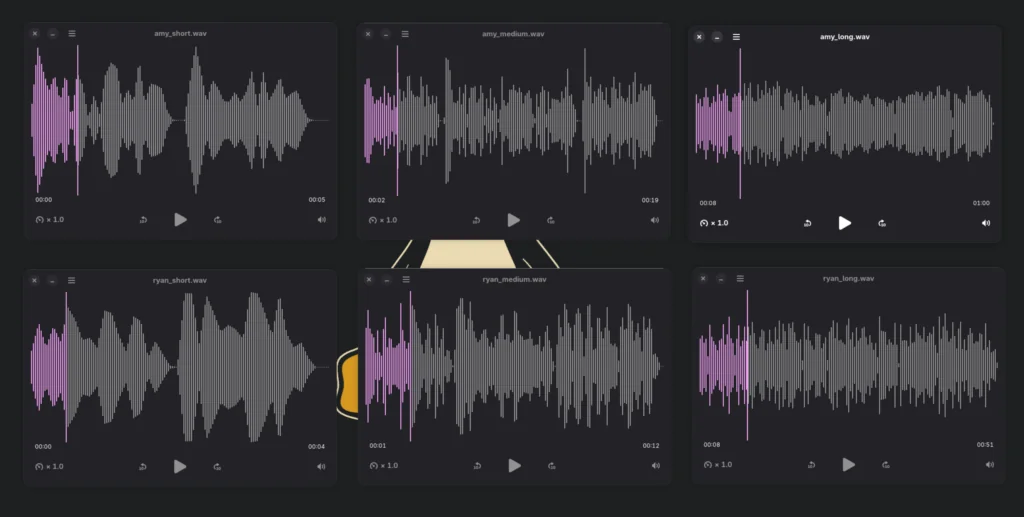
Example output from the Medium text benchmark (Amy Medium voice).
Amy remained consistently around 0.10 RTF across all tested text lengths, generating speech approximately 10× faster than real-time. Ryan required substantially more processing time, with RTF values around 0.65, but still remained faster than real-time on the RK3588.
The results highlight the trade-off between model quality and performance. Medium-quality voices are effectively instantaneous for most interactive workloads, while high-quality voices prioritize speech quality at the cost of significantly longer synthesis times.
Listening Impressions
Benchmark numbers only tell part of the story. The generated audio was also reviewed manually for pronunciation, intelligibility, and overall speech quality.
Both voices produced accurate pronunciation and intelligible output. The en_US-ryan-high voice sounded noticeably more natural than en_US-amy-medium, with smoother pacing, improved intonation, and more realistic speech patterns.
The trade-off is performance. Ryan required roughly six times more processing time than Amy during testing. However, even the high-quality model remained faster than real-time on the RK3588, making it practical for most interactive workloads.
For users prioritizing responsiveness, amy-medium remains an excellent default. For users prioritizing speech quality, ryan-high provides a clear improvement while remaining comfortably usable on ARM64 hardware.
Piper Verdict
Piper is an excellent fit for the RK3588. Installation is straightforward, ARM64 performance is strong, and even high-quality voices remained faster than real-time during testing.
The two voices tested in this article represent only a small subset of the Piper ecosystem. The project provides dozens of voices across multiple languages, accents, and quality tiers, allowing users to optimize for naturalness, storage requirements, or synthesis speed depending on their workload.
For users prioritizing responsiveness, en_US-amy-medium is an excellent default. During testing it consistently generated speech at roughly 10× real-time speed while maintaining clear pronunciation and natural-sounding output.
For users prioritizing speech quality, en_US-ryan-high produced noticeably more natural speech with better pacing and intonation. Although synthesis time increased substantially, it still remained faster than real-time on the RK3588, making it practical for interactive assistants and voice-enabled applications.
For most deployments, the choice comes down to a simple trade-off: Amy for maximum performance, Ryan for maximum quality. Both performed well on the RK1 and demonstrate that high-quality offline speech synthesis is entirely practical on ARM64 hardware.
Part 3: Building a Local Voice Pipeline
Combining Whisper, Ollama, and Piper
The individual components become much more useful when combined into a complete voice pipeline:
Audio Input
      ↓
Whisper.cpp
      ↓
Transcript
      ↓
Ollama (Local LLM)
      ↓
Response
      ↓
Piper
      ↓
Synthesized Audio Output
Each component runs locally on the RK1. Whisper.cpp converts speech into text, Ollama generates a response, and Piper converts the response back into spoken audio.
Practical applications include:
- Offline voice assistants
- Home automation systems with spoken responses
- Voice-controlled dashboards and monitoring tools
- Meeting transcription and summarization
- Accessibility and text-reading tools
- Voice interfaces for self-hosted applications
The entire pipeline operates without cloud APIs, external services, or recurring usage fees. Audio, transcripts, prompts, and generated responses remain on hardware you control.
Combined with the Ollama setup from Article 3, the Turing Pi 2.5 can function as a fully local voice AI platform powered entirely by ARM64 hardware.
End-to-End Demo
The following script combines Whisper.cpp, Ollama, and Piper into a complete local voice assistant pipeline. Given an audio recording, Whisper.cpp transcribes the speech, Ollama generates a response, and Piper converts that response back into spoken audio.
Create a working directory and script:
mkdir -p ~/voice-demo
cd ~/voice-demo

nano voice-assistant.sh
#!/bin/bash

WHISPER_BIN="/mnt/nvme/whisper.cpp/build/bin/whisper-cli"
WHISPER_MODEL="/mnt/nvme/whisper.cpp/models/ggml-small.bin"

OLLAMA_MODEL="gemma3:4b"

PIPER_BIN="/mnt/nvme/piper/piper"
VOICE_MODEL="/mnt/nvme/piper-voices/en_US-ryan-high.onnx"

INPUT_AUDIO="$1"
OUTPUT_AUDIO="response.wav"

if [ -z "$INPUT_AUDIO" ]; then
    echo "Usage: ./voice-assistant.sh input.wav"
    exit 1
fi

echo "=== Step 1: Speech-to-Text ==="

TRANSCRIPT=$(
    "$WHISPER_BIN" \
        -m "$WHISPER_MODEL" \
        -f "$INPUT_AUDIO" \
        --no-timestamps 2>/dev/null |
    grep -v '^whisper_' |
    grep -v '^main:' |
    tr '\n' ' '
)

echo
echo "User:"
echo "$TRANSCRIPT"

echo
echo "=== Step 2: LLM Response ==="

RESPONSE=$(ollama run "$OLLAMA_MODEL" "Summarize the following in one sentence: $TRANSCRIPT")

echo
echo "Assistant:"
echo "$RESPONSE"

echo
echo "=== Step 3: Text-to-Speech ==="

echo "$RESPONSE" | "$PIPER_BIN" \
    --model "$VOICE_MODEL" \
    --output_file "$OUTPUT_AUDIO"

echo
echo "Generated audio: $OUTPUT_AUDIO"
Make it executable and run it:
chmod +x ~/voice-demo/voice-assistant.sh
Run it:
~/voice-demo/voice-assistant.sh \
/mnt/nvme/whisper.cpp/samples/jfk.wav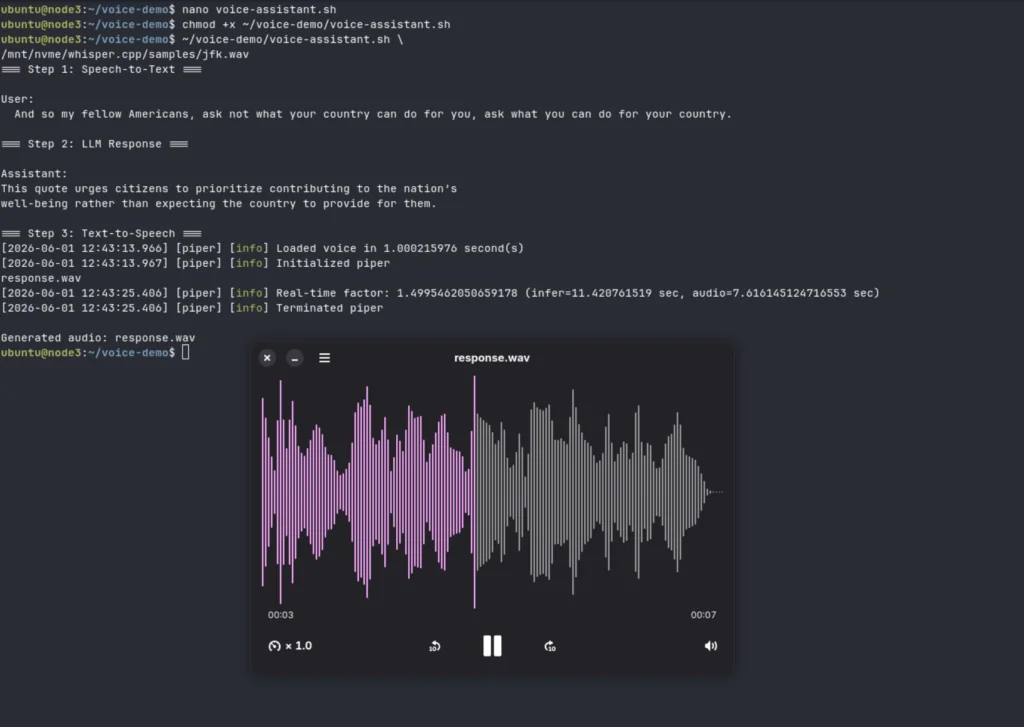
In testing, the complete pipeline successfully transcribed speech with Whisper.cpp, generated a response using Gemma3 through Ollama, and synthesized spoken output with Piper. The included jfk.wav sample from the Whisper.cpp repository was used as the input audio.
While this example is intentionally simple, the same architecture can be extended into a local voice assistant, home automation interface, accessibility tool, or conversational AI system running entirely on ARM64 hardware.
Part 4: Operational Validation
Before building the complete voice pipeline, validate each component independently.
Verify Whisper.cpp
The Whisper.cpp repository includes a built-in sample audio file:
cd /mnt/nvme/whisper.cpp

./build/bin/whisper-cli \
  -m models/ggml-base.bin \
  -f samples/jfk.wav
Expected output:
And so my fellow Americans, ask not what your country can do for you, ask what you can do for your country.
If a transcript is produced, Whisper.cpp is functioning correctly.
Verify Piper
Generate a short speech sample:
echo "The Turing Pi 2.5 is running local text to speech on ARM64." | \
  /mnt/nvme/piper/piper \
  --model /mnt/nvme/piper-voices/en_US-amy-medium.onnx \
  --output_file /tmp/test_tts.wav
The command should complete within a few seconds and create /tmp/test_tts.wav.
Transfer the generated audio to a machine with speakers:
scp ubuntu@rk1-node:/tmp/test_tts.wav .
Then play it locally:
mpv test_tts.wav
or
ffplay test_tts.wav
No audio hardware is required on the RK1 itself.
Verify Ollama
Confirm the Ollama service is running and a model is available:
systemctl status ollama
ollama list
Run a simple inference test:
ollama run gemma3:4b \
  "Explain Kubernetes in one sentence."
Expected output:
Kubernetes is an open-source platform for deploying, scaling, and managing containerized applications.
If the model generates a response successfully, Ollama is ready to participate in the voice pipeline.
Part 5: Troubleshooting
Whisper.cpp binary not found: Recent Whisper.cpp releases use the whisper-cli binary located in build/bin/. If ./main does not exist, use:
./build/bin/whisper-cli
instead.
Model download fails: Whisper and Piper models can be downloaded manually and transferred via SCP if the node has restricted outbound access. Verify that the downloaded files match the expected sizes before troubleshooting further.
Transcription is slower than expected: Larger Whisper models are significantly more computationally expensive. Check htop during inference to confirm that all CPU cores are active and that no other workload is consuming the A76 cores. Benchmark results earlier in this article can be used as a baseline.
Piper fails to load a voice model: Both the .onnx model file and the corresponding .onnx.json configuration file must be present in the same directory. Missing configuration files typically cause Piper to fail during initialization.
Ollama fails to start after moving models to NVMe: Ensure the Ollama service account has permission to access the model directory. A common fix is:
sudo chown -R ollama:ollama /mnt/nvme/ollama
Then restart the service:
sudo systemctl restart ollama
Ollama models consume unexpected storage: By default, Ollama stores models under the user’s home directory. Configure the OLLAMA_MODELS environment variable and move model storage to NVMe before downloading large models.
Storage filling up: Whisper models range from roughly 77 MB (Tiny) to over 1.5 GB (Medium). Piper voice models can exceed 100 MB each, and Ollama models typically require several gigabytes. Store all models on NVMe rather than eMMC.
Piper library errors on launch: The pre-built Piper release bundles required shared libraries. Extract the entire archive and keep the bundled libraries alongside the piper executable. Copying only the binary is insufficient.
Generated speech is unexpectedly long: Some reasoning models may produce verbose responses or expose internal reasoning before the final answer. Use a concise prompt, a non-reasoning model, or post-process the response before passing it to Piper for speech synthesis.
Related Articles
If you’re building a larger ARM homelab around the RK1, these articles complement the voice AI stack covered here:
- Complete RK1 Setup Guide Covers Ubuntu installation, networking, and cluster setup.
- Running LLMs Locally with Ollama and llama.cpp Adds local language models to the voice pipeline demonstrated in this article.
- RK1 Benchmarks Detailed CPU, memory, and performance testing for the RK1 platform.
- Self-Hosted Apps on the Turing Pi 2.5 Explore practical deployments where speech recognition and text-to-speech can be integrated into monitoring, automation, and self-hosted services.
- Ansible Automation for Turing Pi Clusters Useful for deploying Whisper, Piper, and Ollama consistently across multiple nodes.
What You’ve Set Up
At this point you have:
- Whisper.cpp running on Ubuntu 22.04 ARM64
- Tiny, Base, Small, and Medium Whisper models stored on NVMe
- Piper TTS installed and validated
- Benchmark data for transcription speed, memory usage, and voice synthesis
- A complete Whisper → Ollama → Piper voice pipeline running on a single RK1 node
- An entirely offline speech stack with no cloud dependencies
The benchmark results demonstrate that modern speech AI workloads are well within reach of the RK3588. Whisper.cpp, Ollama, and Piper work together to deliver a complete offline voice pipeline that is practical, responsive, and entirely self-hosted.
Whisper.cpp provides reliable speech recognition, Piper delivers high-quality speech synthesis, and Ollama adds local language model inference. Together they form a complete voice assistant stack that runs entirely on a single RK1 node.
No cloud APIs, no recurring costs, and no internet connection required after the models have been downloaded. The complete offline voice pipeline is running today on ARM64 hardware that fits in the palm of your hand.
FAQ
Does Whisper.cpp run well on ARM64?
Yes. Whisper.cpp is well-optimized for ARM64 and takes advantage of NEON instructions available on the RK3588. In testing, all Whisper models from Tiny through Medium ran successfully on the RK1, with Tiny and Base delivering the fastest transcription speeds.
Which Whisper model is best for RK3588?
Small remains the best balance of accuracy and performance for most workloads. Users who prioritize transcription quality can move up to Medium or Large-v3-Turbo, both of which ran successfully on the RK1 during testing. Large-v3-Turbo produced the most accurate results available in Whisper.cpp while remaining practical for offline and batch transcription workloads.
How accurate is Whisper compared to cloud services?
Whisper Small and Medium provide excellent transcription quality for clear speech recordings and general-purpose workloads. Users who require even higher accuracy can move to larger Whisper models, trading additional processing time for improved results. For voice notes, meeting recordings, and narrated content, Whisper delivers high-quality transcription while keeping all data local.
Does Piper require internet access?
No. After downloading the voice model, Piper runs entirely offline. Speech synthesis happens locally on the RK1 with no cloud services, API keys, or network connectivity required.
Can Whisper, Ollama, and Piper run on the same node?
Yes. The end-to-end pipeline demonstrated in this article combines all three components on a single RK1 node. Audio is transcribed with Whisper.cpp, processed by a local LLM through Ollama, and converted back into speech using Piper.
How much RAM is required?
Whisper Tiny and Base use only a few hundred megabytes of memory, while Small remains comfortably under 1 GB. Even Medium stayed near 2 GB during testing. A 16 GB RK1 is sufficient for everything demonstrated in this article, including running Ollama alongside Whisper and Piper.
Do I need the 32 GB RK1?
Not for Whisper.cpp or Piper. The 16 GB model handles the workloads covered in this article comfortably. A 32 GB configuration becomes useful when running larger language models, multiple AI services, or additional cluster workloads alongside the voice stack.
Can the entire voice pipeline run offline?
Yes. Once the models have been downloaded, Whisper.cpp, Ollama, and Piper operate entirely offline. Speech recognition, language generation, and speech synthesis all run locally on the RK1 without an internet connection.